Key Specs
TypeScan-to-CAD
ExportSTP · IGES · DXF
InputSTL · OBJ · PTX
PlatformWindows 10/11 x64
Version
License Type
30-Day Free TrialFree
1-Year Subscription$1,900
3-Year Subscription$4,475
Perpetual License$5,880
Annual Maintenance$590
Network / Cloud Setup$890
$1,900
Annual billing · renewable
Lite & Pro Scan-to-CAD Parametric STP 30-Day Trial
SHINING 3D · Reverse Engineering Software

EXModel
Scan-to-CAD

From 3D scan to parametric CAD — in one environment. Lite for IGES/mesh workflows. Pro for freeform surfacing, parametric STP, and Class A output.
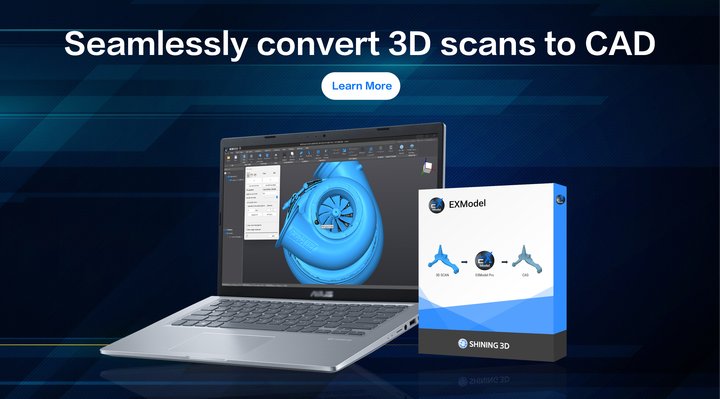
EXModel — Seamlessly Convert 3D Scans to CAD
Scan-to-CAD Software
Close the Gap Between 3D Scan and Production-Ready CAD
One-Click Import
Mesh In → Parametric CAD Out — No Intermediate Steps

EXModel connects directly to every SHINING 3D scanning software suite. After scanning, transfer your mesh data in a single click — no file export, no format conversion, no lost data. Works natively with EXScan Libre, EXScan Rigil, FreeScan, and EXStar. Also accepts STL, OBJ, and PTX from any third-party scanner.

EinScan Libre & RigilFreeScan SeriesAny STL · OBJ · PTX
Import Scan Mesh
Import Scan Mesh
Official SHINING 3D Tutorial
Extract Primitives
Extract Primitives
Official SHINING 3D Tutorial
Primitive Extraction
Planes, Cylinders, Cones & Spheres — Reconstructed Automatically

EXModel instantly reconstructs planes, cylinders, cones, and spheres from your mesh. Establish perpendicularity, parallelism, and coincidence relationships between them. Position your object into the world coordinate system using the extracted primitives — creating the foundation every reverse engineering workflow needs before any sketching begins.

Auto Primitive DetectionConstraint RelationshipsCoordinate Alignment
Mesh Editing
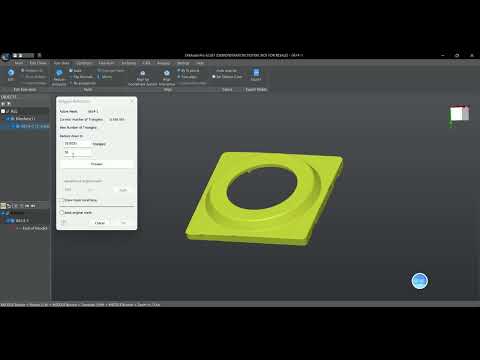
Fill Holes, Remove Outliers, Reduce Polygons — Before You Model

Clean scan data is the foundation of clean CAD. EXModel’s mesh editing tools let you reduce polygon count while preserving accuracy, fill gaps from difficult scan angles, remove noise and outliers, and create watertight meshes ready for 3D printing or reverse engineering — all before you write a single feature.

Polygon ReductionHole FillingWatertight Output
Mesh Selection & Editing
Official SHINING 3D Tutorial
Choose Your Version
EXModel Pro vs EXModel (Lite) — Feature Comparison
Feature EXModel Pro EXModel (Lite)
Mesh editing (fill holes, defeature, reduce)
Primitive extraction (planes, cylinders, cones, spheres)
Reference geometry (lines, points, coordinate system)
IGES export
DXF export
Parametric sketching with dimensions & constraintsPro only
Parametric STEP (STP) exportPro only
Interactive sectioning / cross-section sketchPro only
Freeform 3D curves on meshPro only
Bounded surfaces from 3D sketchesPro only
One-click auto-surfacing (organic shapes)Pro only
Roll / Unroll curved surfacesPro only
Class A / G3 surface continuityPro only
Boolean operations on solidsPro only
Real-time deviation analysisPro only
Price (1-year) $1,900/yr $540/yr
Not sure which version is right for your workflow? Start with the 30-day free trial — Pro features are active for 15 days within that window. Contact Rev1 at (248) 707-2950 and we’ll help you choose.
EXModel Pro Feature Tutorials
— Official SHINING 3D videos — click any to watch
2D Sketching & Extrude
Official SHINING 3D Tutorial
Free Form Basics
Free Form Basics
Official SHINING 3D Tutorial
Automatic Surfacing
Automatic Surfacing
Official SHINING 3D Tutorial
Pro Toolset
Every Tool in the EXModel Pro Workflow
Mesh Editing & Preparation
Polygon reduction, hole filling, outlier removal, defeature, and watertight conversion. Large STL files import up to 2.5× faster in EXModel 2025. The Prepare Scan Wizard automates scan data cleanup before reverse engineering begins.
Primitive & Feature Extraction
Automatically extract planes, cylinders, cones, and spheres. Establish perpendicularity, parallelism, and coincidence relationships. Position geometry into the world coordinate system using extracted primitives. Curvature-based segmentation in 2025 improves precision.
Parametric Sketching
Full dimension and constraint tools create accurate 2D sketches exactly like a dedicated CAD package. Automatic sketch generation from scan data cross-sections. Interactive sectioning extracts reference points — align section planes to extracted primitives, CAD faces, or define them interactively.
Freeform & Organic Surfacing
Draw curves directly on the reference mesh. Create bounded surfaces from 3D sketches. One-click auto-surfacing for organic geometries with snap-to-mesh. Quad surface feature for manual freeform reconstruction. G3 continuous (Class A) surface output for premium finish standards.
Roll / Unroll Surfaces
Flatten or manipulate curved surfaces for sheet metal, packaging, and textile applications. Roll 2D sketches back to their original curved surfaces seamlessly. Particularly effective for complex geometries like turbine blades, ducts, and formed panels.
Real-Time Deviation Analysis
Monitor the error between the newly created CAD model and the original scanned mesh in real time. Custom tolerance values adjust dynamically. Boolean operations on solids with colored display diagnostics. Chamfer and fillet tools include real-time deviation analysis as you drag.
Scanner Integration
Works With Every SHINING 3D Scanner — Plus Any STL/OBJ Source
One-Click Import
Native Integration with EXScan, FreeScan & EXStar Software

EXModel Pro is natively integrated with SHINING 3D’s scanning software suite. After scanning, transfer mesh data to EXModel Pro in a single click from EXScan Libre, EXScan Rigil, FreeScan software, or EXStar. No file export, no conversion, no data loss. EXModel also accepts STL, OBJ, and PTX from any third-party scanner. The 2025 release imports large STL files up to 2.5× faster than previous versions.

EinScan Libre & RigilFreeScan Combo / UE SeriesAny STL · OBJ · PTX
Extract Primitives
Extract Primitives
Official SHINING 3D Tutorial
Your First Reverse Engineering Project
Official SHINING 3D Tutorial
Universal CAD Output
STEP & IGES Export — Drop Into Any CAD Package

Export in STEP format with full parametric history for direct import into SolidWorks, Fusion 360, CATIA, Siemens NX, PTC Creo, Inventor, and Rhino. IGES output handles legacy systems. DXF for 2D drawings and CNC toolpath applications. EXModel Pro files feed directly into 3D printing and CNC machining workflows without any additional conversion step.

STEP (Parametric)IGESDXF (2D)SolidWorks · Fusion · CATIA
System Requirements
EXModel Pro — Minimum & Recommended Specifications
Operating System
Windows 10 / 11 (64-bit)
CPU (Minimum)
Intel i5 or equivalent
RAM (Minimum)
16 GB
Storage
256 GB HDD / SSD recommended
Graphics Card
Dedicated NVIDIA or AMD GPU required
Internet
Recommended for license activation & updates
Input Formats
STL · OBJ · PTX
Export Formats
STEP · IGES · DXF
License Types
Perpetual · 3-Year Sub · 1-Year Sub · Network/Cloud
License Delivery
Email activation — same business day
Current Version
EXModel 2025 (v8.0+)
Free Trial
30 days · Pro features active for first 15 days
Get a License or Start Your Free Trial
Tell us your scanner setup and CAD workflow — we’ll confirm the right license and get you activated within 1 business day.
(248) 707-2950 · (248) 707-2950 · Auburn Hills, MI
Your Authorized Partner
Why Get EXModel Pro Through Rev1 Technologies
Sold & Supported By
Software Publisher
01
Authorized SHINING 3D Partner
Rev1 is an authorized SHINING 3D reseller. EXModel Pro licenses purchased through Rev1 are fully legitimate single-seat licenses with direct manufacturer backing and update eligibility.
02
Same-Day License Activation
Purchase EXModel Pro and receive your activation license via email the same business day. Rev1 handles order processing, license request, and delivery so you’re scanning-to-CAD today — not next week.
03
Free Demo on Your Scan Data
Send Rev1 your scan data — STL or mesh from any scanner — and we’ll run it through EXModel Pro and show you what output looks like for your specific geometry before you commit to a license.
04
Scanner + Software Expertise
Rev1 sells the full SHINING 3D scanner ecosystem alongside EXModel Pro. Our team understands the complete pipeline from scan capture to CAD output and can advise on scanner settings that produce better EXModel Pro results.
05
Upgrade Paths Available
Start with EXModel Lite or a 1-year subscription and upgrade later. SHINING 3D periodically offers upgrade promotions. Rev1 tracks these and proactively alerts customers when upgrade pricing is advantageous.
06
US-Based Technical Support
Direct support from Auburn Hills, Michigan. (248) 707-2950 — not a ticketing queue. Rev1 engineers have run EXModel Pro on real scan data from the EinScan and FreeScan lines and can advise on real workflow challenges.
Common Questions
Frequently Asked — EXModel Pro
What is the difference between EXModel Pro and EXModel (Lite)?
EXModel (Lite) covers mesh editing, primitive extraction, and IGES/DXF export — it does not generate parametric STEP models and lacks freeform surfacing tools. EXModel Pro adds everything needed for professional reverse engineering: parametric sketching with constraints, freeform 3D curves on mesh, bounded surfaces, one-click auto-surfacing for organic shapes, roll/unroll of curved surfaces, Class A (G3) surface output, boolean solid operations, and full STEP export. If you need to produce STP files for SolidWorks, Fusion, CATIA, or any other mainstream CAD package, you need EXModel Pro.
Can I try EXModel Pro before purchasing?
Yes. SHINING 3D offers a 30-day free trial for EXModel. Within that trial period, EXModel Pro features are active for the first 15 days. Add the free trial to your cart through Rev1 — we’ll handle license delivery via email typically the same business day. No credit card required for the trial.
What license type should I choose?
For most professional users: a 1-year subscription ($1,900) is the lowest commitment to validate the software in your workflow. If you know you’ll use EXModel Pro long-term, the 3-year subscription ($4,475) saves versus three individual years. The perpetual license ($5,880) is the best long-term value — it includes 1 year of maintenance for free and you own the license permanently; after year 1, annual maintenance is $590 to stay on the latest version. Contact Rev1 if you’re unsure — we’ll help you match the license to your usage pattern.
Is EXModel Pro compatible with my scanner?
EXModel Pro accepts STL, OBJ, and PTX files from any 3D scanner. Native one-click integration (no file export needed) works with EinScan HX2, FreeScan Combo Series, FreeScan UE Pro & UE Pro2, Einstar, and EinScan Libre (via EXScan Libre). If you own a different scanner, you can still export STL or OBJ and open it in EXModel Pro directly.
What CAD software does STEP output work with?
STEP (STP) is an ISO-standard neutral format accepted by essentially every professional CAD application: SolidWorks, Autodesk Fusion 360, CATIA, Siemens NX, PTC Creo, Inventor, Rhino, and many others. EXModel Pro’s parametric STEP output imports with a history tree in parametric CAD packages, allowing further editing after import.
Does the perpetual license include future updates?
The perpetual license includes 1 year of maintenance, which covers all updates and new versions during that period. After year 1, you can stay on the version you have (perpetually, at no cost) or renew maintenance at $590/year to receive the latest versions including major annual releases like EXModel 2025.
Can I get a multi-seat or network license?
Yes. EXModel Pro offers a Network / Cloud License Setup ($890 setup fee) for multi-seat deployments. University license packs are also available (1-pack, 10-pack, and additional 5-seat increments). Contact Rev1 at (248) 707-2950 to discuss your multi-seat requirements — pricing scales with seat count.
Ready to Close the Scan-to-CAD Gap?
Start Your
Free Trial
Today

30 days free, Pro features active for 15. No credit card required. Rev1 delivers the license via email the same business day. Authorized SHINING 3D Partner · Auburn Hills, Michigan · (248) 707-2950.

(248) 707-2950(248) 707-2950Auburn Hills, MI

Auburn Hills, Michigan's premier source for industrial 3D printers, 3D scanners, materials, and software. Serving engineers and manufacturers across North America.

Products
Company
Contact
Payment methods
AMEXApple PayGoogle PayPayPalShop PayUnionPayVISA
Pay over time

© 2026 Rev1 Technologies. All rights reserved.