Reverse Engineering Software · Scan-to-CAD

PolyWorks Modeler

Reverse engineering for digitized parts. Extract CAD-ready curves, surfaces, and parametric features.

PolyWorks|Modeler turns polygonal scan data into editable CAD geometry. Three modeling tracks run side-by-side inside one project file: polygonal mesh modeling with Booleans and fillet reconstruction, automatic NURBS surfacing for organic shapes, and parametric solid modeling with Extrude / Revolve / Sweep / Loft features. Native add-ins push the result back into CATIA, NX, Creo, SolidWorks, or Inventor with editable history — not a frozen STEP import. Modeler shares its project file with PolyWorks|Inspector, so reverse engineering and dimensional inspection live in one workflow. Full specifications →

24K
Customers
100
Countries
5
Native CAD Add-Ins
1994
Founded
License
Perpetual + Subscription Annual support plan 12 languages
Platform
Windows 10/11 64-bit Network license Floating seats
Workflow
Scan-to-CAD NURBS surfacing Solid modeling CAD plug-ins
Pricing
Contact for Quote · Authorized PolyWorks reseller · USA-based licensing

Rev1 validates scan-source compatibility, CAD-target add-in fit, and the polygonal / NURBS / solid modeling workflow before licensing. Authorized PolyWorks reseller in the USA.
PolyWorks Modeler reverse engineering software box render
01
What It Is

Universal reverse engineering platform. Polygons to CAD, hands-on.

PolyWorks Modeler is the reverse-engineering solution that extracts CAD-grade curves, surfaces, parametric sketches, and prismatic features from polygonal models of digitized parts. One software runs polygonal mesh editing, automatic NURBS surfacing, and parametric solid modeling inside the same project file -- then round-trips the result into CATIA, NX, Creo, SolidWorks, or Inventor through native add-ins with editable history.

Polygonal
Mesh Modeling
Real-time meshing, repair, decimation, hole-filling, and CAD-style Boolean / fillet operations directly on polygonal models. The foundation for every downstream surface or solid output.
NURBS
Surface Modeling
Interactive curve creation paired with automatic surfacing — generate lightweight, watertight NURBS surfaces for organic shapes that no parametric extrude can capture.
Solid
Parametric Features
Extract 2D sketches from digitized geometry, then build solid base features via Extrude, Revolve, Sweep, and Loft. The output is editable inside your CAD platform of record.
02
Universal Device Compatibility

One software platform. Every metrology device on the floor.
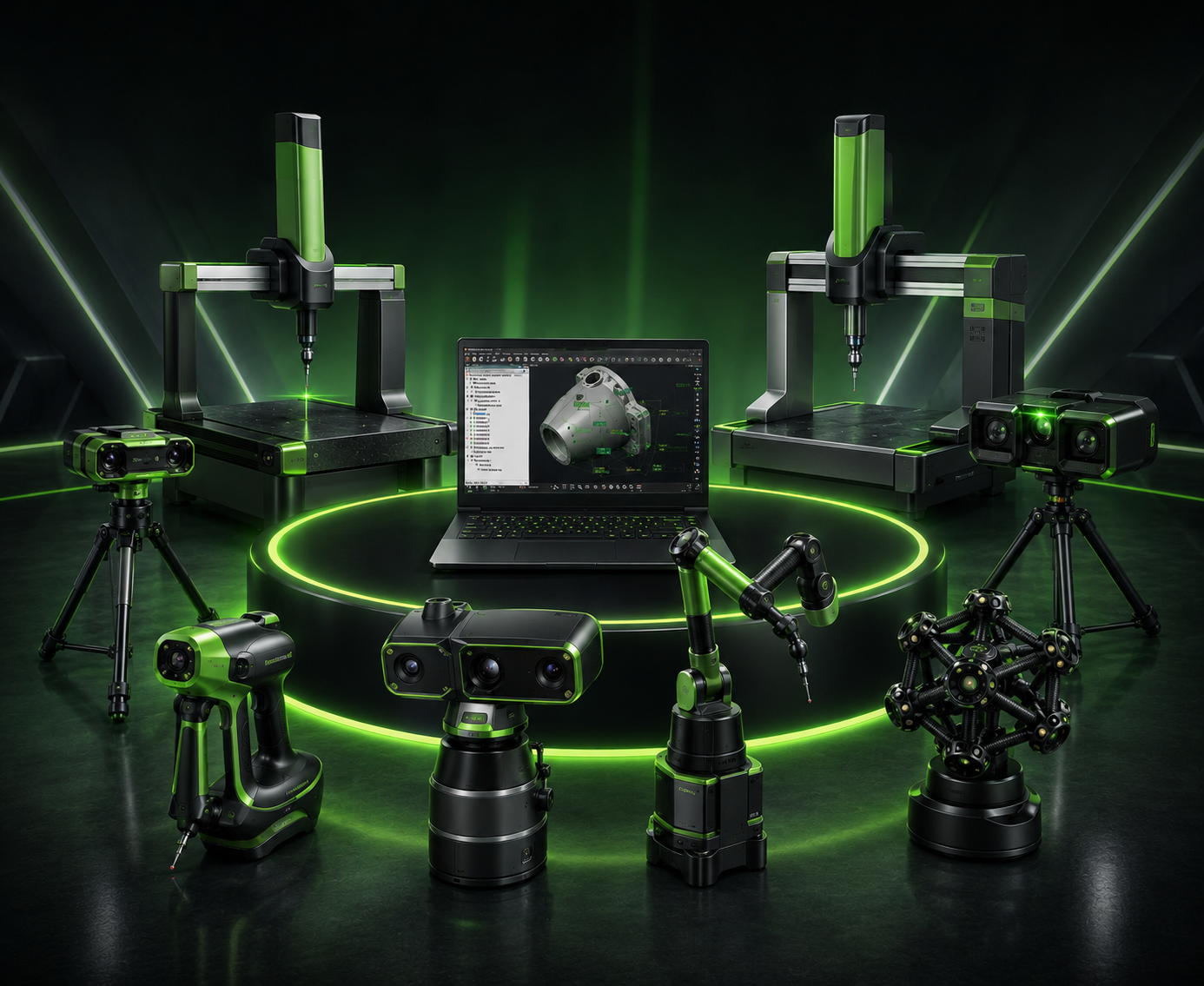
PolyWorks at the center of every metrology device -- CMM, arm, tracker, scanner, photogrammetry, gauge
Inspector at the hub. Every measurement device on the floor reports in.

One modeling project, every measurement device on the floor. The PolyWorks platform interfaces with portable probing devices, point-cloud scanners, CNC CMMs (direct drivers or I++), digital gauges, laser trackers, scanning arms, and spherical-grid digitizers -- a single inspection project can absorb measurements from multiple devices and align them automatically with temperature compensation.

CNC CMM Brands
Direct drivers / I++
Portable Arms
Probing & scanning
Laser Trackers
Large-volume
3D Scanners
Structured / laser
Digital Gauges
Calipers / mics
Photogrammetry
Reference systems
Spherical Digitizers
Aerospace structures
Visual Checks
Operator-entered
Hardware Validation
Already own metrology hardware? PolyWorks probably supports it.

Send Rev1 your device list (CMM brand, scanner, tracker, arm). We will confirm direct-driver support, plug-in availability, and the workflow path before you license.

03
CAD Interoperability

Polygonal . NURBS . Solid. Three modeling tracks, one project file.
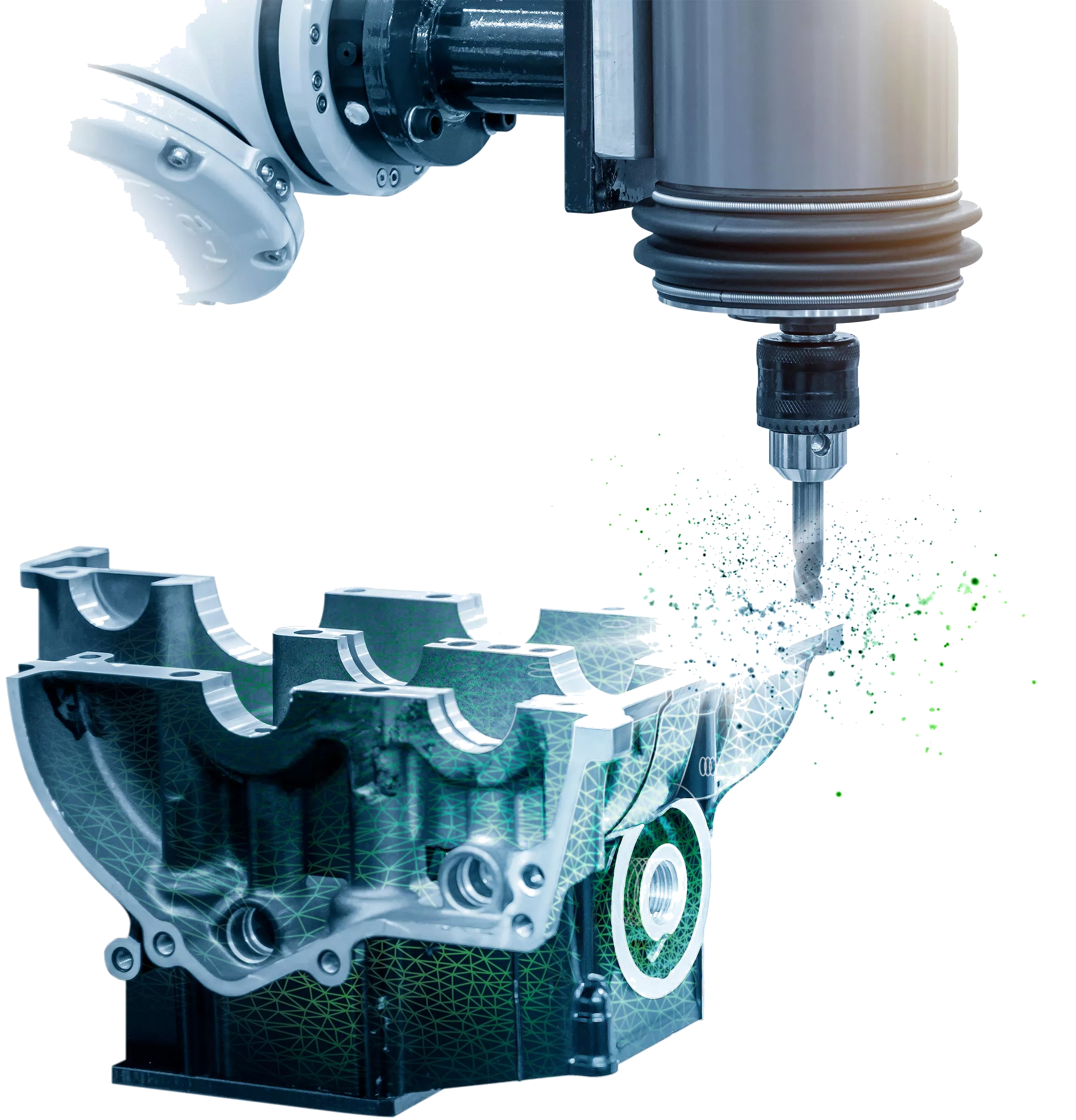
PolyWorks Modeler -- polygonal scan data converted to parametric CAD via the three modeling tracks
Polygonal scan to parametric CAD -- the round-trip Modeler delivers across all five major CAD platforms.

PolyWorks Modeler runs three modeling tracks side-by-side inside the same project. Polygonal modeling turns scan data into clean editable meshes. NURBS surfacing wraps organic geometry in lightweight, watertight surfaces. Parametric solid modeling extracts sketches and base features that round-trip into your CAD platform of record. The result is not a one-way export -- it is reverse engineering that stays connected to CATIA, NX, Creo, SolidWorks, and Inventor through native add-ins.

Polygonal
Mesh Operations
Real-time mesh import, repair, decimation, hole-filling, and CAD-style Boolean / fillet operations — directly on the polygonal model. Foundation for every downstream surface or solid output.
NURBS
Surface Generation
Interactive curve creation paired with automatic surfacing. Lightweight, watertight NURBS surfaces for organic geometry — turbine blades, automotive bodies, consumer product housings.
Solid
Parametric Features
Extract 2D sketches from digitized cross-sections; build solid base features via Extrude, Revolve, Sweep, and Loft. The output is parametric history, not a frozen mesh.
Native
CAD Plug-Ins
Direct add-ins for CATIA, NX, Creo, SolidWorks, and Inventor. Edit features inside your CAD platform of record — no STEP round-trip that loses design intent.
Hybrid
Mesh + Surface
Combine polygonal regions with NURBS surfaces and parametric features in the same model. Pick the right tool for each region — mesh where it fits, surface where it does not.
Round-Trip
Design-to-Manufacture
Bring scanned reality back into the CAD-driven design chain. Update the engineering record from the floor — legacy tools, hand-modified prototypes, as-built parts that drifted from spec.
04
Workflow Automation

Scan-to-CAD. The shortest path from digitized part to editable CAD.

Manufacturing teams reverse engineer when the only authoritative geometry is the physical part — a legacy tool, an obsolete assembly, a hand-modified prototype, an as-built component that drifted from spec. PolyWorks Modeler shortens that path. Mesh editing, surface generation, and parametric feature extraction run inside one project file. CAD plug-ins push the result back to the engineering record without a STEP round-trip that loses parametric intent.

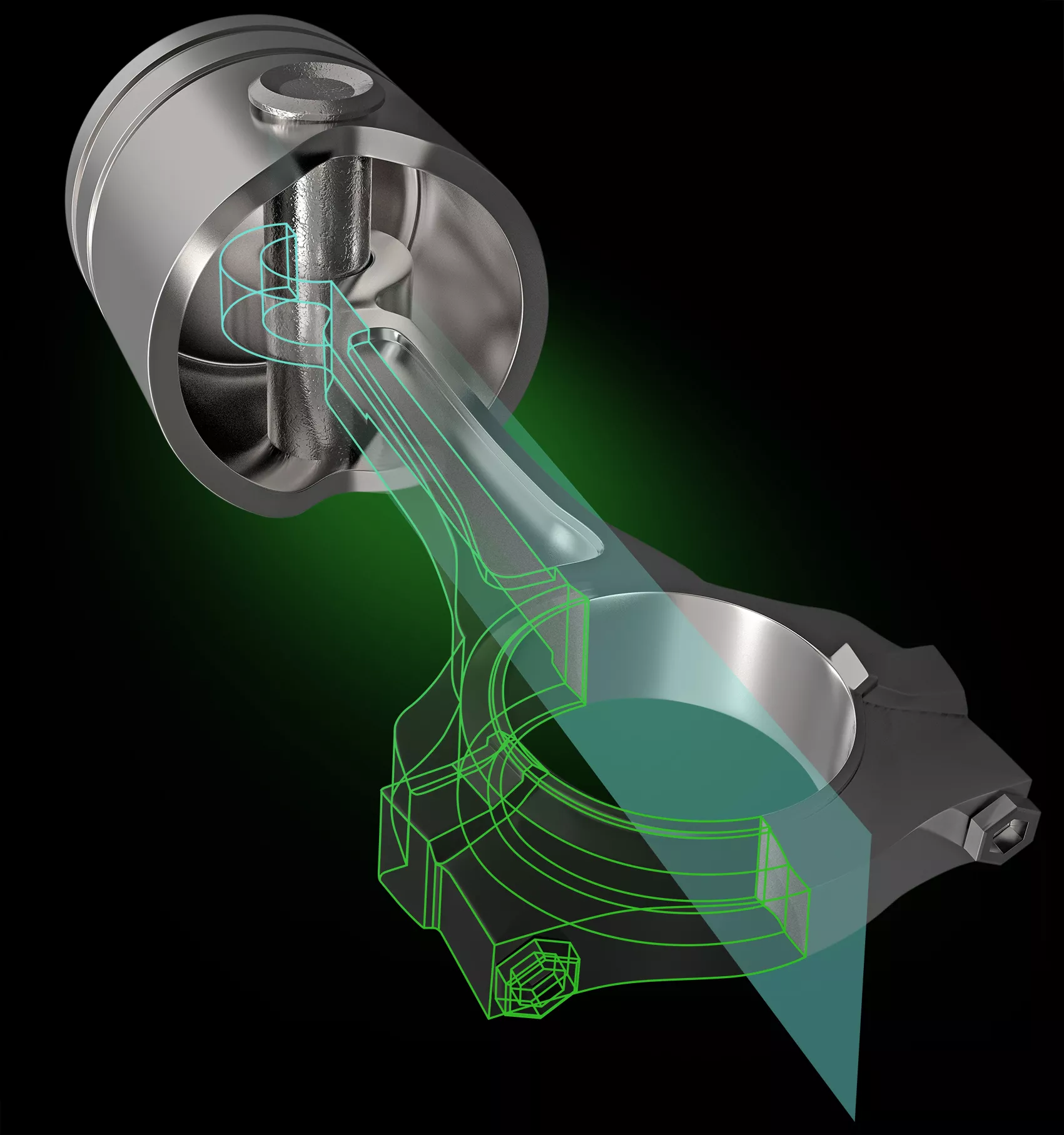
Solid Modeling — parametric features from scan data

Extract 2D sketches from digitized cross-sections, then build solid base features via Extrude, Revolve, Sweep, and Loft operations. The output drops into CATIA, NX, Creo, SolidWorks, or Inventor as editable parametric history — not a frozen mesh.
Native
CAD Add-Ins
Editable
Parametric History
PolyWorks Modeler Solid Modeling -- parametric features from scan data
NURBS Surface Modeling — organic shapes, watertight surfaces

Automatic surfacing turns scanned organic geometry — turbine blades, automotive bodies, consumer product housings — into lightweight, watertight NURBS surfaces. Interactive curve creation handles the cases where automated wrap is not the right call.
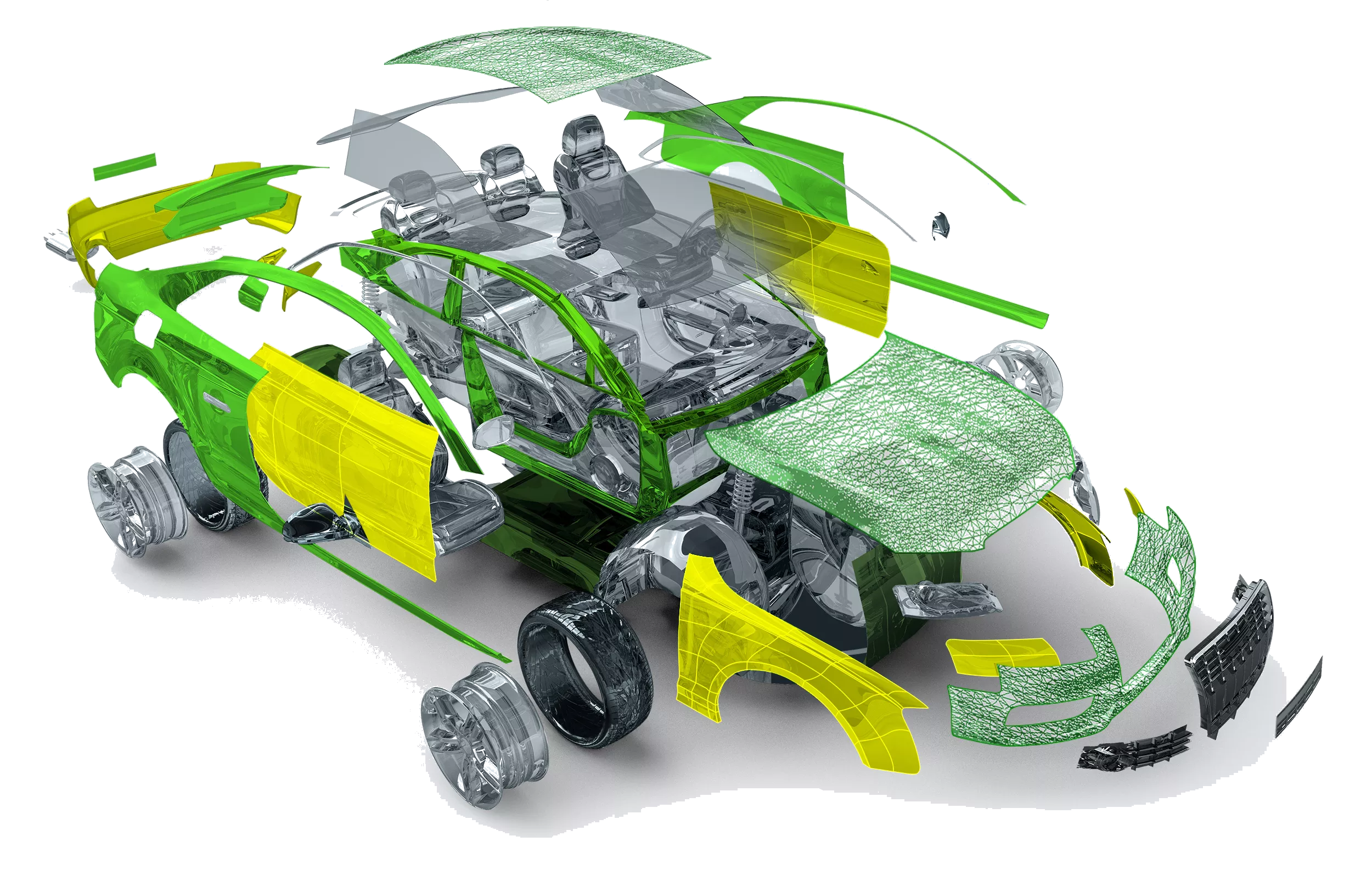
Auto
Surface Wrap
Watertight
NURBS
PolyWorks Modeler NURBS Surface Modeling -- automatic surfacing
05
Customer & Industry Proof

24,000 customers. 100 countries. The 8 largest automakers run roughly 5,500 PolyWorks licenses.

InnovMetric Software (Quebec City, founded 1994) builds PolyWorks. 275+ employees, 210 application specialists in 43 countries, direct presence in 18 countries, carbon-neutral certified since 2007. Awarded multiple Fideides prizes and Mercuriades export awards. Independently certified mathematical algorithms by the German PTB metrology institute.

24,000
Customers Worldwide
Production-grade dimensional inspection deployed across automotive, aerospace, consumer products, and energy in 100 countries.
~5,500
Licenses at Top 8 Automakers
The 8 largest automakers in the world standardize on PolyWorks for body-in-white, powertrain, and assembly inspection -- a long-tenured industry vote.
1994
Founded -- 30+ Year Track Record
PolyWorks predates the modern metrology software market. Continuous development for three decades on the same product line -- not an acquisition rebadge.
06
PolyWorks Ecosystem

PolyWorks Modeler sits inside a complete digital metrology thread.

PolyWorks is not a single application -- it is a connected ecosystem. Inspector and Modeler at the core; DataLoop centralizes measurement data across multi-site teams; AR projects results onto the part via HoloLens; Talisman remote-controls Inspector from a phone on the shop floor; ReportLoop pipes data into Excel and Power BI; PMI+Loop closes the model-based-definition loop with native CAD platforms.

08
Hardware Compatibility

Plug-ins for the metrology brands you already operate.
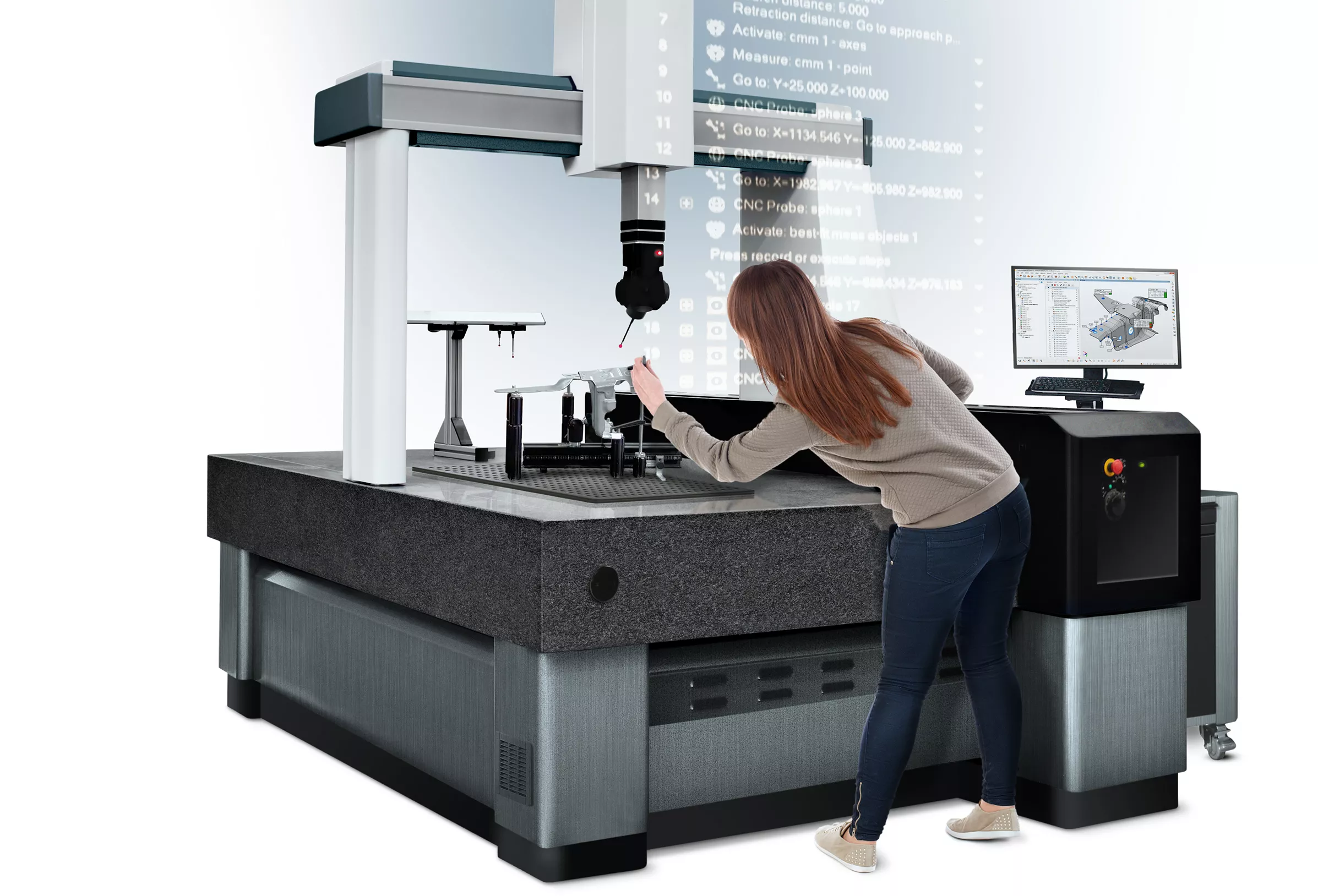
PolyWorks Modeler running on production metrology hardware -- scan data feeding the modeling workflow
Scan-source agnostic. Modeler ingests from every major metrology brand on the floor.

Direct hardware plug-ins (no driver shim) for portable arms, scanners, trackers, CMMs, photogrammetry systems, and digital gauges from the major metrology vendors. Where a direct plug-in is not available, the I++ DME standard or QIF / native-format file import keeps the workflow integrated.

Hexagon
CMM / arm / tracker
Zeiss
CMM / scanner
Mitutoyo
CNC CMM
Faro
Arm / tracker / scanner
Creaform
Handheld scanner
SHINING 3D
FreeScan / OptimScan / AutoScan
API Services
Laser tracker
I++ DME
Cross-brand CNC
09
Industries Served

Built for production environments where dimensional control is not optional.

Automotive
Stamping die analysis, legacy tool reverse engineering, body-side panel modeling from BIW scans. Heavy use at tier-1 automotive suppliers.
Aerospace
Turbine blade / fan / compressor airfoil surface modeling, fixture reverse engineering, mating-surface extraction for legacy assemblies.
Consumer Products
Plastic injection-mold tooling reverse engineering, electronics housing surface modeling, prototype-to-CAD conversion for design iteration.
Energy
Wind-turbine blade as-built surface modeling, oil-and-gas component reverse engineering, power-plant rotor geometry capture.
Medical Device
Implant surface modeling from scanned anatomy, surgical-instrument reverse engineering, custom prosthetic CAD generation from patient data.
Heavy Equipment
Legacy machine part reverse engineering, ground-engaging tool surface modeling, large-piece scan-to-CAD at high part complexity.
Tool & Die
Mold reverse engineering, worn-tooling re-creation, hand-modified prototype geometry captured as parametric CAD with history that survives.
General Mfg / Job Shop
Universal device support means scan input from any metrology hardware — turn polygonal data into CAD features for downstream design and tooling.
10
File Formats & Reporting

Every CAD format in. Every report format out.

CAD In
Native + neutral
CATIA, NX, Creo, SolidWorks, Inventor (native via plug-ins). STEP, IGES, JT, Parasolid, STL, OBJ, PLY (neutral). QIF MBD packages with full GD&T preservation.
CAD Out
Native + neutral
Push parametric solids, NURBS surfaces, and curves back into CATIA, NX, Creo, SolidWorks, Inventor via native plug-ins with editable history. Neutral export to STEP, IGES, JT, Parasolid, Rhino.
Mesh Out
STL / OBJ / PLY
Clean polygonal exports for downstream 3D printing, FEA preprocessing, or visualization — watertight meshes from scan input.
11
Competitive Comparison

PolyWorks Modeler vs. the reverse-engineering software market.

Reverse-engineering software is judged on three things: scan ingestion fidelity, modeling tool depth (polygonal / NURBS / solid), and how cleanly the output round-trips into your CAD platform of record. Geomagic Design X, Geomagic Wrap, Ansys SpaceClaim (Discovery), and Hexagon Cyclone 3DR each take different strategic angles.

Capability PolyWorks Modeler Geomagic Design X Geomagic Wrap Ansys SpaceClaim (RE) Hexagon Cyclone 3DR
Scan-to-CAD modeling tracks Polygonal + NURBS + Solid -- one project Polygonal + parametric solid (LiveTransfer) Polygonal + auto-surface only Direct-edit solid; limited mesh Mesh + limited surface
Polygonal mesh operations Real-time mesh, Booleans, fillets Strong polygonal toolkit Industry-leading mesh editing Limited mesh editing Strong mesh editing
NURBS surface generation Automatic + interactive, watertight Automatic surfacing module Auto-Surface module Surface-from-mesh (basic) NURBS via Cyclone 3DR module
Parametric solid modeling Extrude / Revolve / Sweep / Loft from scan LiveTransfer to CAD parametric Not native -- exports only Direct-edit (no history) Not native
Native CAD plug-ins CATIA, NX, Creo, SolidWorks, Inventor SolidWorks, Creo, NX (limited) None (file-based export only) SpaceClaim is itself a CAD app Hexagon Designer ecosystem
Shared file with inspection Inspector + Modeler -- one project file Separate (Control X + Design X) Separate (Wrap + Control X) SpaceClaim / Discovery (separate) Cyclone 3DR (separate)
Algorithm certification PTB-certified mathematical algorithms Internal validation Internal validation Internal validation Internal validation
Multi-site data management PolyWorks|DataLoop -- on-prem / Azure / AWS Geomagic Manage (file-based) File-based File-based Hexagon Nexus cloud
Free read-only viewer PolyWorks|Reviewer -- free desktop viewer Web viewer (limited) Web viewer Ansys Discovery free trial No free viewer
Vendor scale InnovMetric -- 24K customers, 100 countries 3D Systems -- public co. portfolio 3D Systems -- same parent Ansys -- public co. Hexagon AB -- public co.
12
License & System Requirements

PolyWorks Modeler -- complete specifications.

Licensing
Module
PolyWorks|Modeler
Vendor
InnovMetric Software (Quebec City, Canada)
Version
2025
License Type
Perpetual + Subscription
License Term
Annual support plan
Floating / Network
Network / floating seats supported
Languages
12 (English, French, German, Spanish, Italian, Japanese, Korean, Chinese, Portuguese, Czech, Polish, Turkish)
Maintenance Plan
Annual support & upgrade plan available
System Requirements
Operating System
Windows 10 64-bit / Windows 11 64-bit
Processor
Intel Core i7 or AMD Ryzen 7 (8 cores recommended for large meshes)
Memory (RAM)
16 GB minimum -- 32 GB recommended for large polygonal datasets
Graphics
NVIDIA Quadro / RTX with 4 GB VRAM (8 GB for NURBS-heavy projects)
Storage
50 GB SSD recommended for project + CAD output files
Display
1920x1080 minimum -- 4K recommended for large datasets
Capability
Modeling Tracks
Polygonal + NURBS Surface + Parametric Solid
Algorithm Certification
PTB (Physikalisch-Technische Bundesanstalt)
Surface Generation
Automatic + interactive — watertight NURBS
Parametric Features
Extrude / Revolve / Sweep / Loft from scan data
Mesh Operations
Booleans, fillets, decimation, hole-filling, repair
Supported Scan Devices
Portable Arms
Hexagon, Faro, Kreon — direct plug-in
Laser Trackers
Faro, API, Hexagon — direct plug-in
3D Scanners
SHINING 3D, Creaform, Hexagon, Faro, Zeiss
CNC CMMs
Direct drivers + I++ DME standard
File Formats
CAD Native (read+write)
CATIA, NX, Creo, SolidWorks, Inventor
CAD Neutral
STEP, IGES, JT, Parasolid, Rhino
Polygonal / Cloud (in)
STL, OBJ, PLY, ASCII / binary point clouds
MBD
QIF (full GD&T preservation)
Output
Native CAD via plug-ins, STEP, IGES, STL, OBJ
Integration Add-ons
Inspection
PolyWorks|Inspector (same project file -- combined RE + QC)
Data Mgmt
PolyWorks|DataLoop (on-prem / Azure / AWS)
Reporting
PolyWorks|ReportLoop (Excel / Power BI)
MBD
PolyWorks|PMI+Loop (CAD-native plug-ins)
14
Authorized Partner

PolyWorks software with Rev1 application support.
Sold & Supported By
Rev1 Technologies logo
Software By
PolyWorks by InnovMetric logo

A metrology software platform is an application decision, not a license SKU. Rev1 helps validate the scan-source fleet, CAD-target add-in fit, modeling-track strategy (polygonal / NURBS / solid), and output round-trip plan before PolyWorks Modeler is deployed across your engineering team.

01
Application & Hardware Review

Confirm that PolyWorks Modeler fits the scan-source fleet, the target CAD platforms (CATIA / NX / Creo / SolidWorks / Inventor), and the desired output type (mesh / NURBS / parametric solid) -- before licensing. Modeler vs Inspector vs Design X is not a one-size answer.

02
Macros, Templates & Training

Operator training, macro scripting for proprietary techniques, and report-template build-out at install. Rev1 packages the consultative side of the deployment so operators are productive on day one.

03
US-Based Support

License provisioning, renewal, version upgrades, troubleshooting, and engineering guidance from Auburn Hills, Michigan -- not from grey-market resellers or unauthorized importers. Authorized PolyWorks reseller.

Why it matters: Buying through Rev1 means PolyWorks is paired with hardware-fit review, training, and local support planning -- not treated like a software-only line item disconnected from the metrology floor.
15
Buyer FAQ

PolyWorks Modeler questions buyers ask before licensing.

What does PolyWorks Modeler actually do?
PolyWorks Modeler is the reverse-engineering solution that extracts CAD-grade curves, surfaces, parametric sketches, and prismatic features from polygonal models of digitized parts. One software runs three modeling tracks side-by-side — polygonal mesh modeling, NURBS surface generation, and parametric solid modeling — inside the same project file. Native add-ins push the output back to CATIA, NX, Creo, SolidWorks, or Inventor with editable history. Modeler shares its project file with PolyWorks|Inspector, so reverse engineering and dimensional inspection live in one workflow.
Which metrology hardware brands does PolyWorks Modeler support?
PolyWorks interfaces with all major CMM brands (Hexagon, Zeiss, Mitutoyo, Wenzel) via direct drivers or the I++ DME standard, portable arms (Hexagon Absolute Arm, Faro, Kreon) via direct plug-in, laser trackers (Faro, API, Hexagon), and 3D scanners (SHINING 3D, Creaform, Hexagon, Zeiss, Faro). Where a direct plug-in is not available, QIF or native-format file import keeps the workflow integrated.
Is PolyWorks Modeler a perpetual license or a subscription?
PolyWorks Modeler is offered as either a perpetual license with annual maintenance and support, or as an annual subscription. Floating / network licensing is supported for both — letting a single seat float across the engineering team. Rev1 helps buyers choose the right model based on seat count, deployment timing, and the long-term software-budget treatment in the buyer's organization.
What CAD formats can PolyWorks Modeler import?
Native CAD imports for CATIA, NX, Creo, SolidWorks, and Inventor via plug-ins. Neutral CAD imports for STEP, IGES, JT, Parasolid, and Rhino. Polygonal and point-cloud formats include STL, OBJ, PLY, and ASCII / binary point clouds. QIF Model-Based Definition packages are imported with full GD&T preservation -- no re-keying.
Does PolyWorks Modeler push parametric features back to my CAD platform?
Yes. Modeler ships native plug-ins for CATIA, NX, Creo, SolidWorks, and Inventor. Parametric solid features (Extrude, Revolve, Sweep, Loft), NURBS surfaces, and curves push directly into the CAD platform with editable history — not as a frozen STEP import. The round-trip preserves design intent, so the reverse-engineered geometry becomes part of the engineering record rather than a one-way export.
Are PolyWorks algorithms independently certified?
Yes. The mathematical algorithms used in PolyWorks for surface fitting, deviation analysis, best-fit alignment, and dimensional measurement are certified by the Physikalisch-Technische Bundesanstalt (PTB) -- the German national metrology institute. That independent traceability matters for regulated workflows where internal-only validation is not sufficient.
How does PolyWorks Modeler compare to Geomagic Design X?
Both are leading reverse-engineering platforms in a similar price tier. Geomagic Design X (3D Systems) is the closest direct competitor — strong polygonal modeling, LiveTransfer to SolidWorks / Creo / NX, and a mature parametric workflow. PolyWorks Modeler is the universal-platform play — three modeling tracks (polygonal, NURBS, solid) inside one project, native add-ins for all five major CAD platforms (CATIA, NX, Creo, SolidWorks, Inventor), and the same project file as PolyWorks|Inspector. Buyers choose Modeler when reverse engineering and dimensional inspection are part of the same workflow, or when the CAD-target list spans more than the Geomagic core trio.
How does PolyWorks Modeler compare to Ansys SpaceClaim / Discovery?
SpaceClaim (now Ansys Discovery) is a direct-modeling CAD tool with a reverse-engineering module for working from scan data — it edits geometry without parametric history. PolyWorks Modeler is a dedicated reverse-engineering platform with parametric-history output that round-trips back to CATIA, NX, Creo, SolidWorks, or Inventor via native plug-ins. Buyers choose Modeler when the output needs to land in a history-based CAD record, when polygonal modeling depth matters (Booleans, fillets, decimation), or when the same project will be paired with PolyWorks|Inspector for QC.
What is the PolyWorks ecosystem -- DataLoop, AR, Talisman, ReportLoop, PMI+Loop?
Inspector (dimensional inspection) and Modeler (reverse engineering) are the core applications and share the same project file. DataLoop centralizes 3D measurement data across multi-site teams (on-prem, Azure, or AWS). AR projects measurement results onto the part via Microsoft HoloLens 2. Talisman is a free iOS / Android remote control for Inspector on the shop floor. ReportLoop links inspection data live into Excel and Power BI. PMI+Loop closes the model-based-definition loop natively inside CATIA, NX, Creo, SolidWorks, and Inventor. Reviewer is a free desktop viewer that opens any PolyWorks project read-only -- ship it to any colleague.
Is Rev1 Technologies an authorized PolyWorks reseller in the United States?
Yes. Rev1 Technologies is an authorized PolyWorks / InnovMetric reseller and integration partner for the United States, based in Auburn Hills, Michigan. License provisioning, renewal, version upgrades, operator training, macro scripting, hardware-fit review, and engineering guidance are delivered from the US -- not from grey-market resellers or unauthorized importers. PolyWorks is engineered by InnovMetric Software (Quebec City), founded 1994, serving 24,000 customers across 100 countries. The 8 largest automakers in the world run roughly 5,500 PolyWorks licenses combined.
Ready for answers?
Talk through the application before you license.

Use the FAQ as the starting point. Rev1 can confirm hardware fit, GD&T standard, report-template requirements, and license model before PolyWorks Modeler is purchased.

Final Step

Get a quote or schedule a PolyWorks Modeler application review.

Rev1 validates hardware fit, GD&T standard, report-template requirements, multi-site data strategy, and total cost of ownership before you commit. Authorized PolyWorks reseller in the USA.

Auburn Hills, Michigan's premier source for industrial 3D printers, 3D scanners, materials, and software. Serving engineers and manufacturers across North America.

Products
Company
Contact
Payment methods
AMEXApple PayGoogle PayPayPalShop PayUnionPayVISA
Pay over time

© 2026 Rev1 Technologies. All rights reserved.