FREE 3D-SCANNING & DATA-PROCESSING SOFTWARE • SHINING 3D • REV1 TECH

SHINING 3D EXScan Guided Scanning · Post-Processing · Mesh Editing · STL / OBJ / PLY Out

The scanning software that ships free with every EinScan 3D scanner — capture, align, edit, and export watertight mesh in one guided workflow, with no license fee and free updates for life.
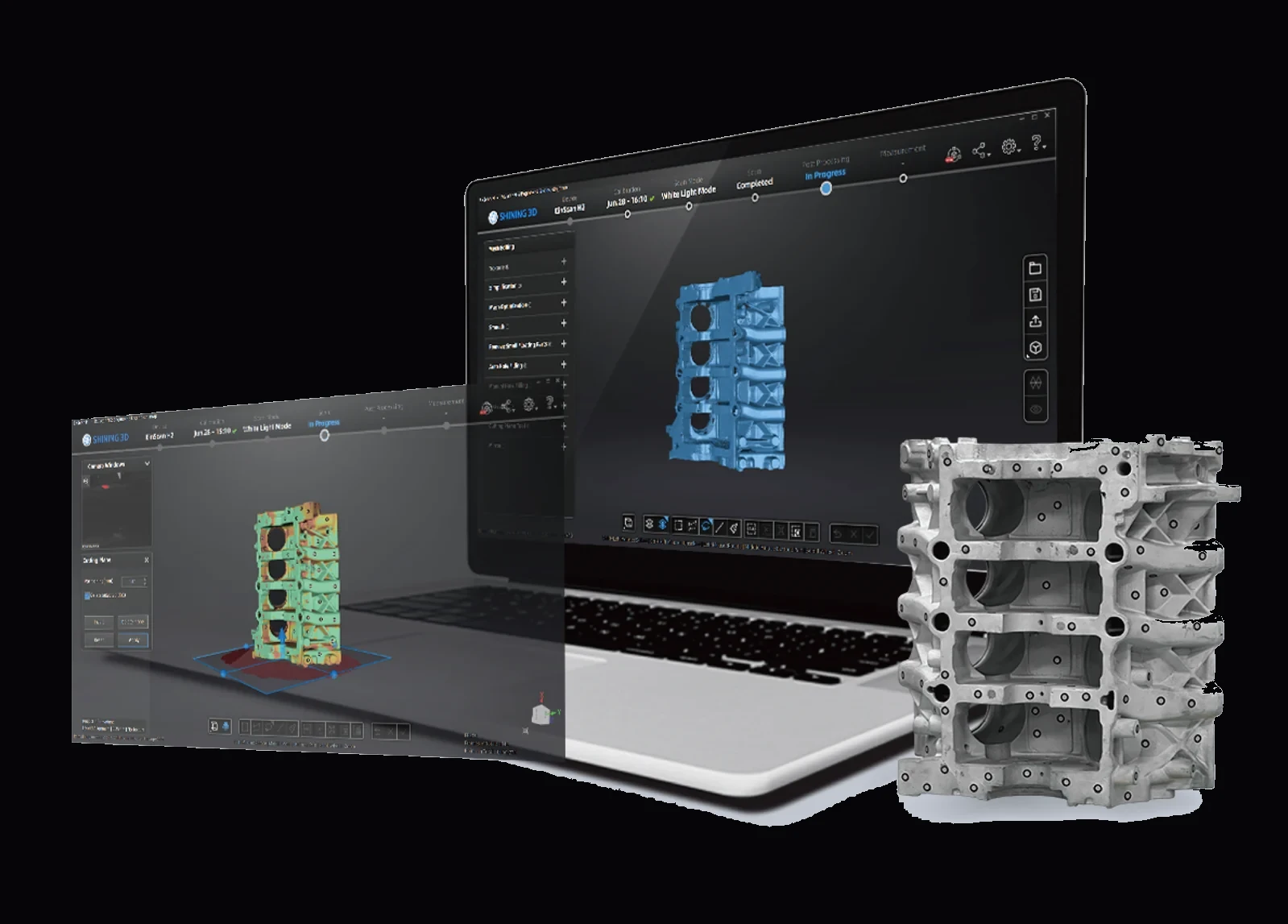
SHINING 3D EXScan software running on a laptop, post-processing a white-light scan of a metal engine block

EXScan is SHINING 3D's versatile scanning software, purpose-built for the EinScan series. It guides you step-by-step from calibration through scanning and data editing — with scan rewind (up to 200 frames), a live data-quality indicator, an auto cutting-plane, and a full post-processing toolset for clean, hole-fill, simplification, smoothing, and sharpening. Export watertight STL, OBJ, PLY, ASC, 3MF, or P3 for reverse engineering, inspection, 3D printing, or CAD. Use and maintenance are free of charge. Full specifications →

FreeWith Every EinScan
200 FramesScan Rewind
STL / OBJ / PLYMesh Export
Free UpdatesFor Life
License
Free of chargeBundled with scannerFree updates
Platform
Windows 64-bitDesktopEinScan series
Workflow
Guided scanningAuto alignmentPost-processingMesh export
Pricing
Free · included with every EinScan 3D scanner No license fee · free software updates · download from SHINING 3D support

EXScan ships free with every EinScan scanner Rev1 sells — Rev1 confirms scanner pairing, version fit, and workflow before you deploy, as your authorized SHINING 3D reseller and US support partner. Questions? Call (248) 707-2950.

Download EXScan →
SHINING 3D EXScan software running on a laptop, post-processing a white-light scan of a metal engine block
Rev1 Technologies · Software & Application Support

Authorized SHINING 3D Software Reseller in the USA.

EXScan is built by SHINING 3D — 20 years in 3D metrology with 400+ authorized patents — and ships free with every EinScan scanner. Rev1 Technologies is your authorized SHINING 3D reseller and US application-support partner, Auburn Hills, Michigan.

Scanner Pairing & Version Fit Guided Software Setup Scan-Workflow Training US Phone & Video Support
SHINING 3D — 3D scanning software vendor
SHINING 3DSoftware Vendor
Rev1 Technologies — authorized SHINING 3D software reseller, Auburn Hills MI
Rev1 TechnologiesUS Support Partner
What It Is

One Guided Workflow. Scan In, Watertight Mesh Out.

SHINING 3D EXScan is the versatile scanning software that drives the EinScan series — and it is free of charge with every scanner. It guides you step-by-step from calibration through capture, alignment, and data editing, then hands off a clean, watertight mesh in the format your downstream tools expect. There is no license fee, and software updates are free for the life of the scanner.

Guided
Scanning Workflow
Step-by-step guidance from calibration to scan to edit, with scan rewind (up to 200 frames) and a live data-quality indicator so you fix gaps before you leave the scan — no rescanning.
Post
Processing Tools
A rich mesh-editing toolset — clean, hole filling, data simplification, smoothing, and sharpening — plus an auto cutting-plane that removes the turntable base automatically.
STL / OBJ / PLY
Mesh Export
Export watertight STL, OBJ, PLY, ASC, 3MF, or P3 global-markers files for reverse engineering, inspection, CAD, or 3D printing — the mesh your downstream tools expect.
Post-Processing & Mesh Editing

Clean, Fill, and Refine the Mesh — In the Same App.
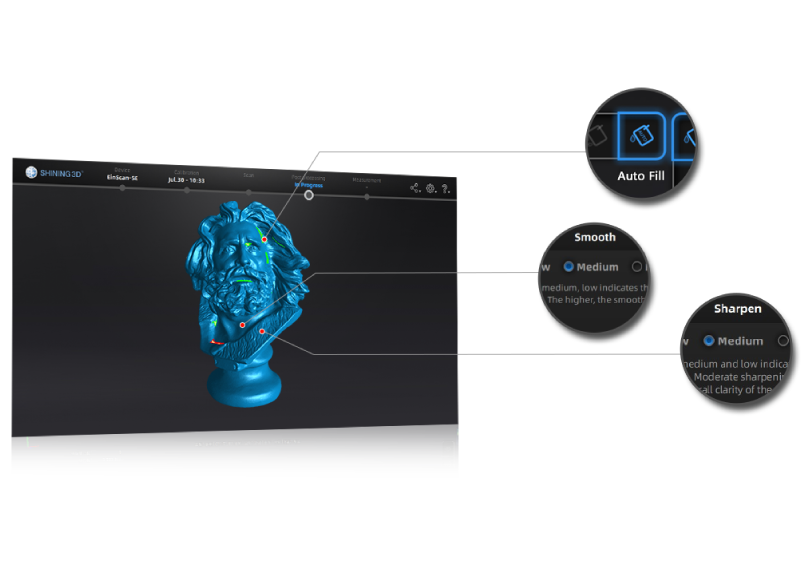
SHINING 3D EXScan post-processing panel showing Auto Fill, Smooth, and Sharpen tools on a scanned bust mesh

Auto Fill, Smooth & Sharpen

The mesh is processed automatically the moment a scan finishes, and EXScan's post-processing tab gives you a full editing toolset to take it the rest of the way. Auto and manual hole filling close gaps, data simplification and mesh optimization control file size, and smoothing and sharpening balance surface finish against detail. Remove small floating parts, mirror geometry, and apply an auto cutting-plane — all with adjustable low / medium / high strength.

Hole FillAuto · manual
CleanupSimplify · optimize · floating-part removal
FinishSmooth · sharpen (low / med / high)
OutputWatertight mesh
Capture, Alignment & CAD Hand-Off

Scan Once, Align Automatically, Export to CAD.
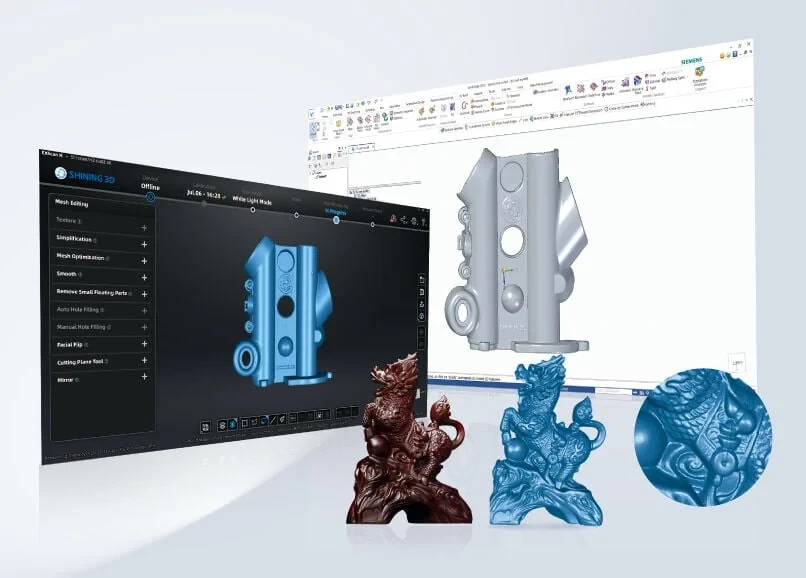
SHINING 3D EXScan mesh-editing panel next to the exported scan opened in Siemens NX CAD software

Rewind, Auto-Align & Straight to CAD

EXScan guides capture with a live data-quality indicator — red where data is thin, green where it is sufficient — and scan rewind lets you roll back up to 200 frames to correct a misalignment instead of starting over. Marker, feature, and hybrid alignment stitch multi-angle scans automatically, and the auto cutting-plane drops the turntable base for you. The finished watertight mesh exports straight into CAD, inspection, or reverse-engineering software.

RewindUp to 200 frames
AlignmentMarker · feature · hybrid
CAD Hand-OffSTL / OBJ / PLY into NX, SOLIDWORKS & more
Intelligent Editing

Smart Defaults With Full Manual Control.
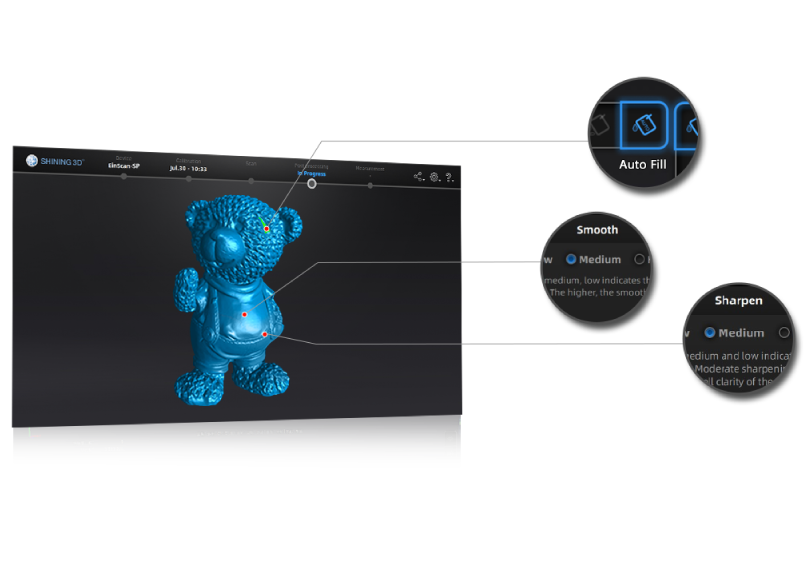
SHINING 3D EXScan editing tools — Auto Fill, Smooth, and Sharpen callouts on a scanned teddy-bear mesh
Intelligent Algorithms

One-Click Cleanup, or Dial It In Yourself

Intelligent algorithms handle the routine work automatically — auto hole filling, auto cutting-plane, and one-click optimization — while every tool still exposes low / medium / high strength for full manual control. Smoothing evens out noise, sharpening restores edge detail, and simplification trims triangle count without losing accuracy, so the same scan can go straight to 3D print or feed a precision reverse-engineering workflow.

Auto Hole Fill + Cutting Plane Adjustable Smooth / Sharpen Data Simplification
Want to see the workflow end-to-end?
Book a live EinScan + EXScan demo with Rev1.
Bring a representative part — Rev1 runs the full EXScan workflow live: guided capture, auto-alignment, post-processing, and mesh export. See exactly how the free software pairs with the right EinScan scanner for your parts. No purchase required.
Formats & Sharing

Export the Mesh — or Publish It Straight to the Web.
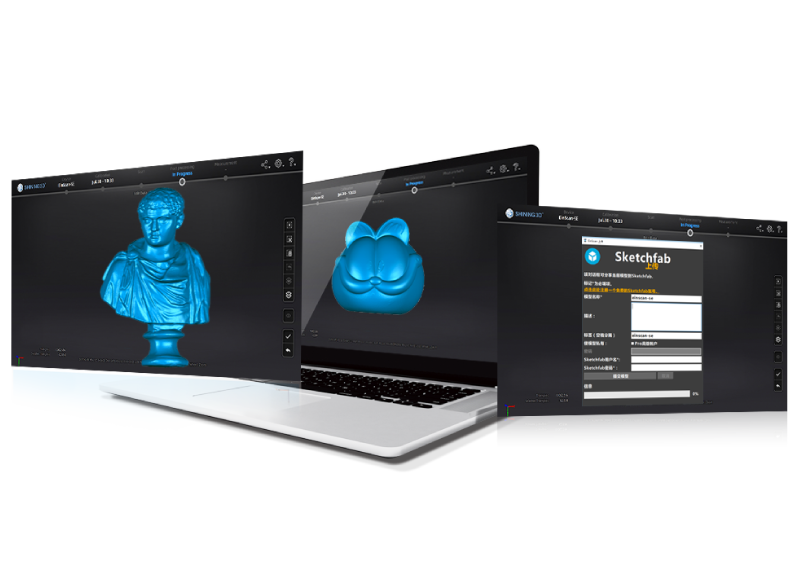
SHINING 3D EXScan showing finished scan results with a one-click publish-to-Sketchfab dialog

STL, OBJ, PLY, ASC, 3MF & P3

EXScan exports the finished mesh as STL, OBJ, PLY, ASC, or 3MF, plus a P3 global-markers file for re-loading marker frames — so the scan drops cleanly into reverse-engineering, inspection, CAD, or slicing software. Textured scans carry full-color data, and a built-in one-click publish sends the model straight to Sketchfab to share online. Whatever the downstream tool, EXScan hands off a format it accepts without translation.

Mesh OutSTL · OBJ · PLY · ASC · 3MF
MarkersP3 global-markers file
PublishOne-click to Sketchfab
Applications

One Free Software, Every EinScan Application.

Wherever an EinScan scanner captures a part, EXScan turns it into a usable mesh. Pair the right EinScan scanner with EXScan and book a live scan demo on your own part.
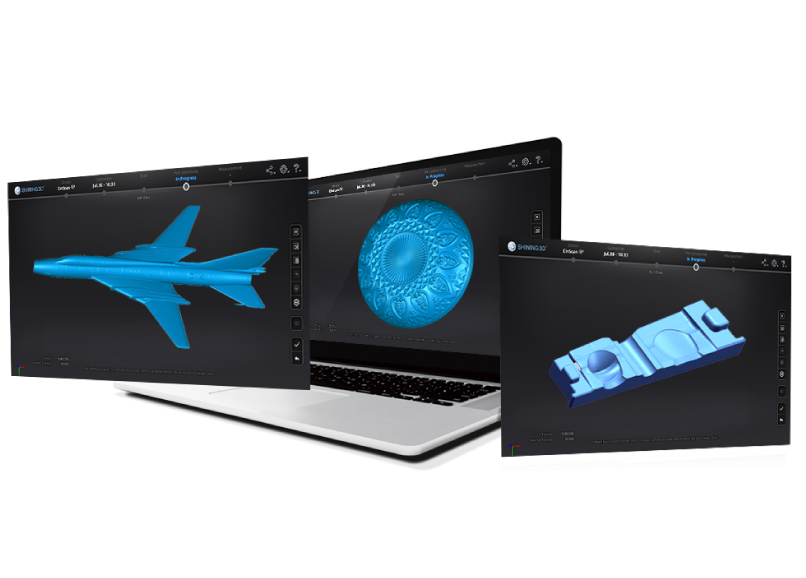
Reverse Engineering Prep Dimensional Inspection 3D-Print Model Capture Art, Heritage & Sculpture Product & Industrial Design Automotive & Motorsport Education & Research Healthcare & Orthotics
SHINING 3D EXScan viewing finished scan meshes of an aircraft, a turbine, and lettered artwork across three screens
Any EinScan, Any Part

From Table-Top Objects to Full Assemblies

Because EXScan drives the whole EinScan family — desktop SE / SP, handheld Pro, H, and HX series — the same workflow scales from a small table-top part to a full vehicle body. Capture, align, edit, and export once, and the mesh is ready for whatever comes next: reverse engineering in EXModel, inspection in Geomagic Control X, print prep, or a shareable web model. One free tool, the whole EinScan lineup.

Editions & Availability

EXScan, EXScan Pro & EXScan H — All Free With the Scanner.

SHINING 3D ships an EXScan edition matched to each EinScan family — and every one is free of charge, bundled with the scanner, with free updates for life. Rev1 confirms the right EinScan scanner and makes sure the matching EXScan version is installed and configured for your parts.

Free
EXScan S / SE & SP
The desktop-scanner edition for EinScan SE, SP, SE V2, and SP V2 — fixed and auto turntable scanning with the full guided capture-to-mesh workflow. Free with the scanner.
Free
EXScan Pro
The handheld edition for the EinScan Pro / Pro 2X series — fixed, handheld HD, and handheld rapid scan modes, with the same rewind, alignment, and post-processing toolset. Free with the scanner.
Free
EXScan H / HX
The hybrid-light edition for the EinScan H, H2, and HX series — infrared plus white / blue-light capture with the full EXScan editing and export pipeline. Free with the scanner.
License FeeNone — free of charge
Software UpdatesFree for life
DeliveryUSB key + support download
MaintenanceFree
Rev1 SetupIncluded with your EinScan
Competitive Analysis

SHINING 3D EXScan vs. Artec Studio vs. Revopoint Studio

How EXScan compares on the things that matter in scanner-bundled software — license cost, guided workflow, post-processing depth, and export formats.

CapabilitySHINING 3D EXScanArtec StudioRevopoint Studio
License costFree — bundled with scannerPaid subscriptionFree
Guided step-by-step workflowCalibrate → scan → edit, guidedGuidedGuided
Scan rewindUp to 200 framesFrame editingLimited
Post-processing toolsClean, fill, simplify, smooth, sharpenExtensiveClean, fill, simplify
Export formatsSTL, OBJ, PLY, ASC, 3MF, P3STL, OBJ, PLY + moreSTL, OBJ, PLY
Software updatesFree for lifeWith subscriptionFree

Competitor figures are approximate, from publicly available manufacturer information, and vary by version and hardware; provided by Rev1 Technologies for general orientation. EXScan is included free with every EinScan scanner and covers the full capture-to-mesh workflow with free lifetime updates; Artec Studio leads on the deepest professional post-processing feature set, and Revopoint Studio on a lightweight free workflow for its own scanners. Rev1 can scope all three against your parts and scanner.

EXScan is free — the scanner is the decision.
Let Rev1 pair you with the right EinScan.
EXScan ships free with every EinScan. What matters is which scanner fits your parts, accuracy, and budget — desktop, handheld, or hybrid-light. Rev1 scopes your application and recommends the right EinScan, then makes sure EXScan is set up for your workflow.
Specifications

SHINING 3D EXScan Technical Data & System Requirements

Software
SHINING 3D EXScan (S / Pro / H editions)
Vendor
SHINING 3D Tech Co., Ltd.
Category
3D-scanning & data-processing software
Price
Free — bundled with every EinScan scanner
License Type
Free of charge · no license fee
Maintenance
Free — software updates included for life
Scan Modes
Fixed / turntable, handheld HD & rapid (by scanner)
Scan Rewind
Up to 200 frames
Alignment
Marker, feature, and hybrid
Post-Processing
Clean, hole fill, simplify, smooth, sharpen, cutting plane
Operating System
Windows 10 / 11 64-bit
Processor
Intel Core i7 / i9 or AMD Ryzen 7 / 9
Memory (RAM)
16 GB minimum — 32 GB recommended for large scans
Graphics
NVIDIA GTX / RTX with 4 GB+ VRAM (8 GB for large data)
Storage
SSD recommended for scan / project data
Display
1920 x 1080 minimum — 4K recommended
Export Formats
STL, OBJ, PLY, ASC, 3MF, P3 (global markers)
Publishing
One-click publish to Sketchfab
Compatible Scanners
EinScan SE / SP, SE V2 / SP V2, Pro / Pro 2X, H / H2, HX
Download
Free from SHINING 3D / EinScan support portal

RESOURCES

Downloads & Technical Support

Everything you need to install, update, and get the most out of SHINING 3D EXScan.

EXScan Software Download
Download the latest free EXScan build for your EinScan model from the SHINING 3D support portal — Rev1 confirms the right version for your scanner.
Download EXScan →
Live Demo
See EXScan run the full capture-to-mesh workflow on your own part. Rev1 pairs the right EinScan scanner and walks you through it — no purchase required.
Rev1 Technical Support
Installation, version fit, scanner pairing, workflow training, and calibration help from Rev1 — call (248) 707-2950.

WHY REV1 TECH

Authorized SHINING 3D Reseller. Industrial Metrology Specialists.

Rev1 Technologies is an authorized SHINING 3D partner headquartered in Auburn Hills, MI, with direct expertise in 3D scanning, reverse engineering, and quality-control workflows.

YOUR REV1 PARTNER
AUTHORIZED SHINING 3D RESELLER

Rev1 serves manufacturers, design shops, and QC teams across the USA. EXScan is free with every EinScan — but the value is in the pairing: we scope the application, recommend the right scanner, configure the software, train operators, and support your team so the scan-to-mesh pipeline delivers from day one.

01
Application & Scanner Review
Our engineers confirm which EinScan scanner and EXScan edition fit your parts, accuracy, and throughput before you buy — not after.
02
Software Setup & Operator Training
EXScan installation, calibration, workflow configuration, and hands-on operator training — anywhere in the U.S.
03
Free Demo on Your Data
Send Rev1 a representative part — we run the full EXScan capture-to-mesh workflow and deliver the result before you buy.
04
Direct Engineering Support
Call (248) 707-2950 — a person answers. Scanning and software help for the life of the deployment.
05
Updates & Version Guidance
EXScan updates are free — Rev1 flags the right version for your scanner and helps you upgrade cleanly.
06
Software & Hardware Pairing
Rev1 pairs EXScan with the right EinScan scanner and validates the end-to-end scan-to-mesh pipeline.
Buyer FAQ

SHINING 3D EXScan — questions buyers ask.

What is SHINING 3D EXScan?
EXScan is SHINING 3D's versatile scanning software, purpose-built for the EinScan series. It guides you step-by-step from calibration through 3D scanning and data editing: capture with scan rewind and a live data-quality indicator, auto-align multi-angle scans, run a full post-processing toolset (clean, hole fill, simplify, smooth, sharpen), and export a watertight mesh as STL, OBJ, PLY, ASC, 3MF, or P3.
How much does EXScan cost?
EXScan is free. Use and maintenance of the software are free of charge, and it is bundled with every EinScan 3D scanner — delivered on a USB key with the scanner and available to download from the SHINING 3D support portal. Software updates are free for life. There is no license fee and no subscription; the scanner is the purchase, and the software comes with it.
Which EinScan scanners does EXScan support?
SHINING 3D ships an EXScan edition for each EinScan family: the S edition for desktop EinScan SE / SP and SE V2 / SP V2, EXScan Pro for the handheld EinScan Pro / Pro 2X series, and EXScan H for the hybrid-light EinScan H, H2, and HX. Rev1 confirms the exact version for your scanner and makes sure it is installed and configured for your parts.
What file formats does EXScan export?
EXScan exports the finished mesh as STL, OBJ, PLY, ASC, or 3MF, plus a P3 global-markers file for re-loading marker frames. Those formats drop straight into reverse-engineering (such as EXModel), inspection (such as Geomagic Control X), CAD, or 3D-print slicing software. Textured scans carry full color, and a one-click publish sends the model to Sketchfab.
What post-processing tools does EXScan include?
The mesh is processed automatically after each scan, and the post-processing tab adds a full editing toolset: auto and manual hole filling, data simplification, mesh optimization, smoothing, sharpening, removal of small floating parts, mirror, and an auto cutting-plane that drops the turntable base. Most tools offer low / medium / high strength for one-click defaults or full manual control.
What is scan rewind and the data-quality indicator?
Scan rewind lets you roll back up to 200 frames during capture to correct a misalignment instead of rescanning — the selected frame is highlighted so you can pick exactly where to resume. The data-quality indicator colors the preview red where data is insufficient and green where it is sufficient, so you can see and fill gaps before you leave the scan.
What are the system requirements?
EXScan runs on Windows 10 / 11 64-bit. Rev1 recommends an Intel Core i7 / i9 or AMD Ryzen 7 / 9, 16 GB RAM (32 GB for large scans), an NVIDIA GTX / RTX GPU with at least 4 GB VRAM (8 GB for large data), an SSD for scan data, and a 1920 x 1080 display (4K recommended). Rev1 confirms your workstation meets the requirements for your scanner.
Can I use EXScan output for reverse engineering or CAD?
Yes. EXScan produces a watertight mesh that feeds directly into downstream tools: reverse-engineer it into a CAD solid in SHINING 3D EXModel, inspect it in Geomagic Control X, or import the STL / OBJ / PLY into your own CAD, CAM, or slicing software. Rev1 can scope and set up the full pipeline — scanner, EXScan, and the reverse-engineering or inspection software.
What does Rev1 include with an EinScan + EXScan purchase?
Rev1 is your authorized US SHINING 3D reseller and support partner: application and scanner review, EXScan installation and calibration, workflow configuration, operator training, version guidance, and a free demo on your own part before you buy. EXScan itself is free with the scanner — Rev1 makes sure the whole pipeline works. Call (248) 707-2950.

FREE WITH EVERY EINSCAN

Get SHINING 3D EXScan From an Authorized Reseller

EXScan is free with every EinScan scanner. Download the latest build, or schedule a demo first. Rev1 confirms scanner pairing, version fit, and workflow — and supports your team through deployment.

Reply within 1 business day Free software & free updates Authorized SHINING 3D reseller in the USA Training & setup included
Download EXScan →

Auburn Hills, Michigan's premier source for industrial 3D printers, 3D scanners, materials, and software. Serving engineers and manufacturers across North America.

Products
Company
Contact
Payment methods
AMEXApple PayGoogle PayPayPalShop PayUnionPayVISA
Pay over time

© 2026 Rev1 Technologies. All rights reserved.