FREE ORTHOTICS & PROSTHETICS SCANNING SOFTWARE • SHINING 3D • REV1 TECH

SHINING 3D EXScan O&P Guided Body Capture · Preset Scan Modes · Auto Alignment · STL / OBJ Out

The orthotics-&-prosthetics scanning software that ships free with the EinScan Medixa and EinScan H2 — capture the residual limb, foot, socket, torso, or cranium and hand off a clean, print-ready mesh in one guided workflow, with no license fee and free updates for life.
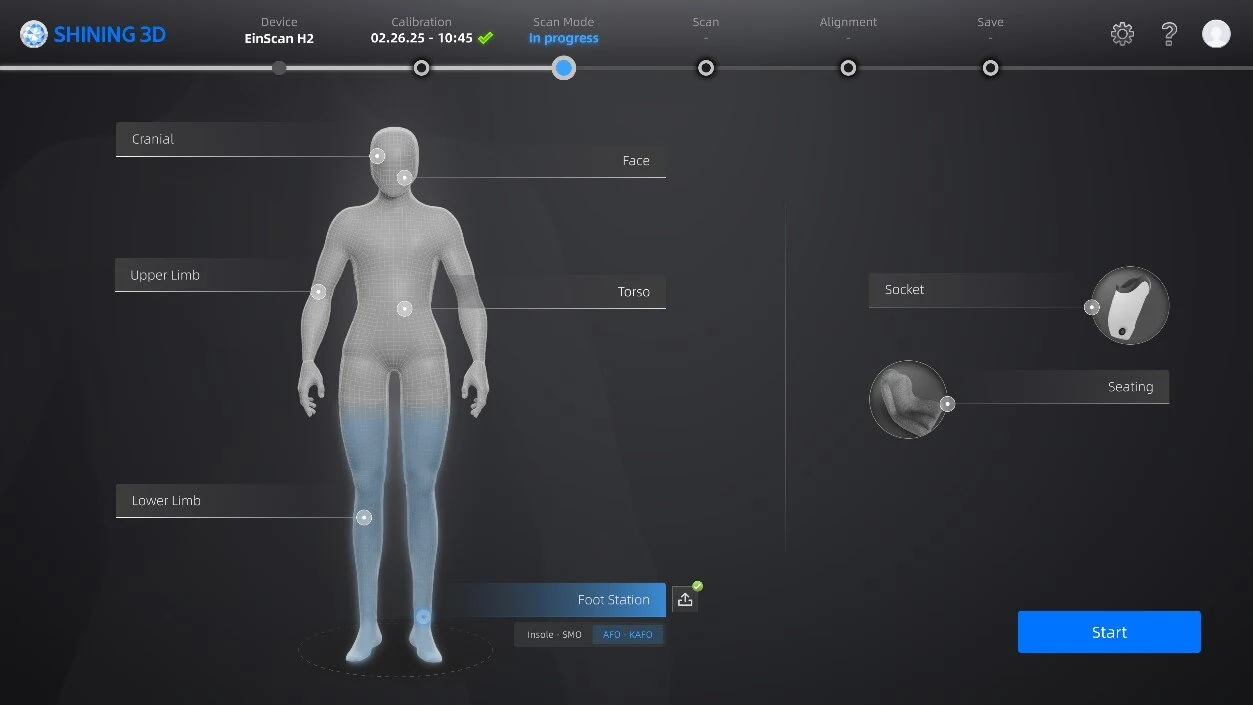
SHINING 3D EXScan O&P body scan-mode selection screen with cranial, limb, torso, foot, and socket presets

EXScan O&P is SHINING 3D's dedicated orthotics-and-prosthetics scanning software, purpose-built for the EinScan Medixa and EinScan H2. It guides you step-by-step from mode selection through capture, automatic alignment, and export — with pre-configured presets for cranial, face, upper limb, torso, lower limb, foot station (insole, SMO, AFO / KAFO), seating, and socket. An intelligent alignment algorithm minimizes manual post-processing, and every scan exports a watertight STL or OBJ ready for your O&P CAD / CAM software. Use and maintenance are free of charge. Full specifications →

FreeWith Medixa / H2
8 PresetsBody Scan Modes
STL / OBJMesh Export
Free UpdatesFor Life
License
Free of chargeBundled with scannerFree updates
Platform
Windows 64-bitDesktopEinScan Medixa / H2
Workflow
Preset scan modesAuto alignmentContact-freeMesh export
Pricing
Free · included with the EinScan Medixa O&P scanner No license fee · free software updates · download from SHINING 3D support

EXScan O&P ships free with every EinScan Medixa and EinScan H2 Rev1 sells — Rev1 confirms scanner pairing, version fit, and O&P workflow before you deploy, as your authorized SHINING 3D reseller and US support partner. Questions? Call (248) 707-2950.

Download EXScan O&P →
SHINING 3D EXScan O&P body scan-mode selection screen with cranial, limb, torso, foot, and socket presets
Rev1 Technologies · Software & Application Support

Authorized SHINING 3D O&P Software Reseller in the USA.

EXScan O&P is built by SHINING 3D — 20 years in 3D metrology with 400+ authorized patents — and ships free with the EinScan Medixa and EinScan H2. Rev1 Technologies is your authorized SHINING 3D reseller and US application-support partner, Auburn Hills, Michigan.

Scanner Pairing & Version Fit Guided Software Setup O&P Workflow Training US Phone & Video Support
SHINING 3D — orthotics and prosthetics 3D scanning software vendor
SHINING 3DSoftware Vendor
Rev1 Technologies — authorized SHINING 3D software reseller, Auburn Hills MI
Rev1 TechnologiesUS Support Partner
What It Is

One Guided Workflow. Body Capture In, Print-Ready Mesh Out.

SHINING 3D EXScan O&P is the dedicated orthotics-and-prosthetics scanning software that drives the EinScan Medixa and EinScan H2 — and it is free of charge with the scanner. It guides you step-by-step through mode selection, contact-free capture, automatic alignment, and export, then hands off a clean, watertight mesh in the format your O&P CAD / CAM tools expect. There is no license fee, and software updates are free for the life of the scanner.

Preset
Body Scan Modes
Pre-configured presets for cranial, face, upper limb, torso, lower limb, foot station (insole, SMO, AFO / KAFO), seating, and socket — each tuned for the body part so operators get high-quality data without tweaking parameters.
Auto
Intelligent Alignment
An intelligent alignment algorithm stitches multi-angle passes automatically and minimizes manual post-processing, with movement compensation that holds accuracy even when the patient shifts during capture.
STL / OBJ
Mesh Export
Export watertight STL and OBJ meshes ready for O&P CAD / CAM — socket design, insole and AFO modelling, and 3D printing — the digital cast your downstream design software expects, with no plaster round-trip.
Preset Scan Modes

Pick the Body Part. EXScan O&P Tunes the Rest.
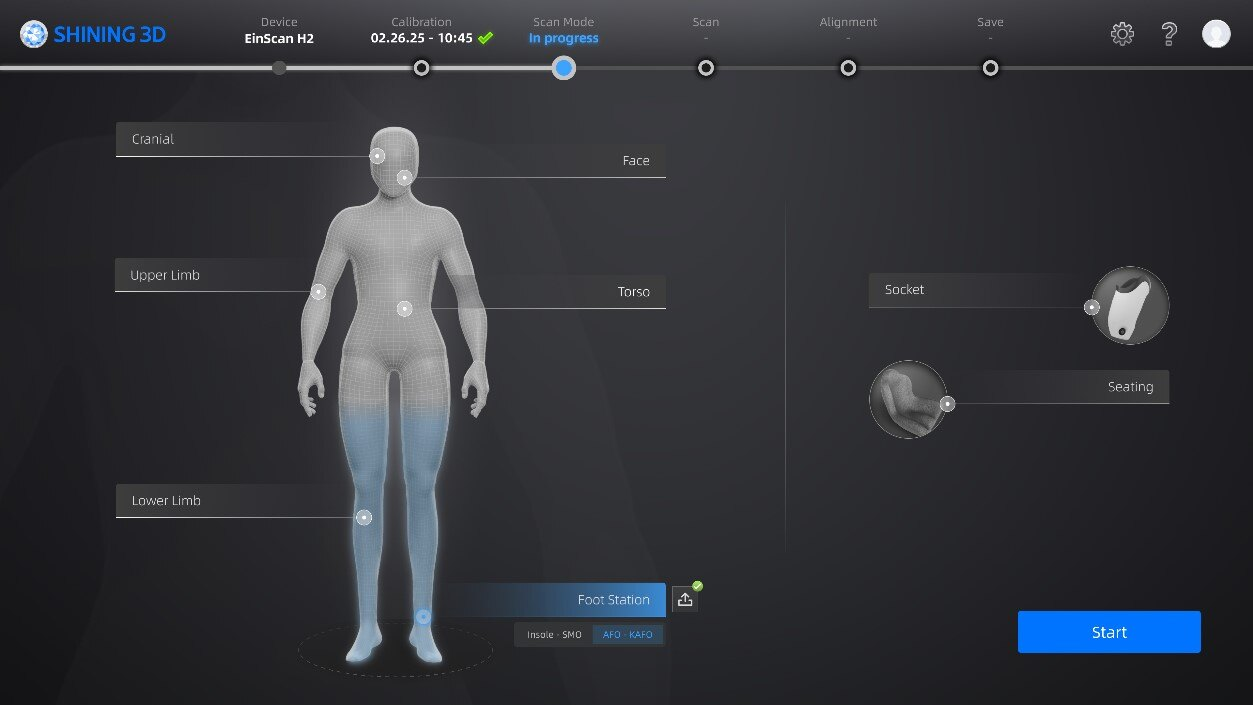
EXScan O&P scan-mode screen with a body model and cranial, limb, torso, foot-station, and socket presets

Cranial, Limb, Foot, Torso & Socket

EXScan O&P opens on a body model where you select the region you need — cranial, face, upper limb, torso, lower limb, foot station, seating, or socket — and the software applies pre-configured scan parameters tuned for that part. The Foot Station mode adds insole, SMO, and AFO / KAFO sub-presets for a scanning platform. Because the settings are already optimized, operators capture clean, high-quality data on the first pass without manual parameter tuning.

Body PresetsCranial · face · limb · torso
Foot StationInsole · SMO · AFO / KAFO
AlsoSeating · socket
TuningPre-configured per part
Contact-Free Capture & Alignment

Scan the Patient, Align Automatically, Skip the Plaster.
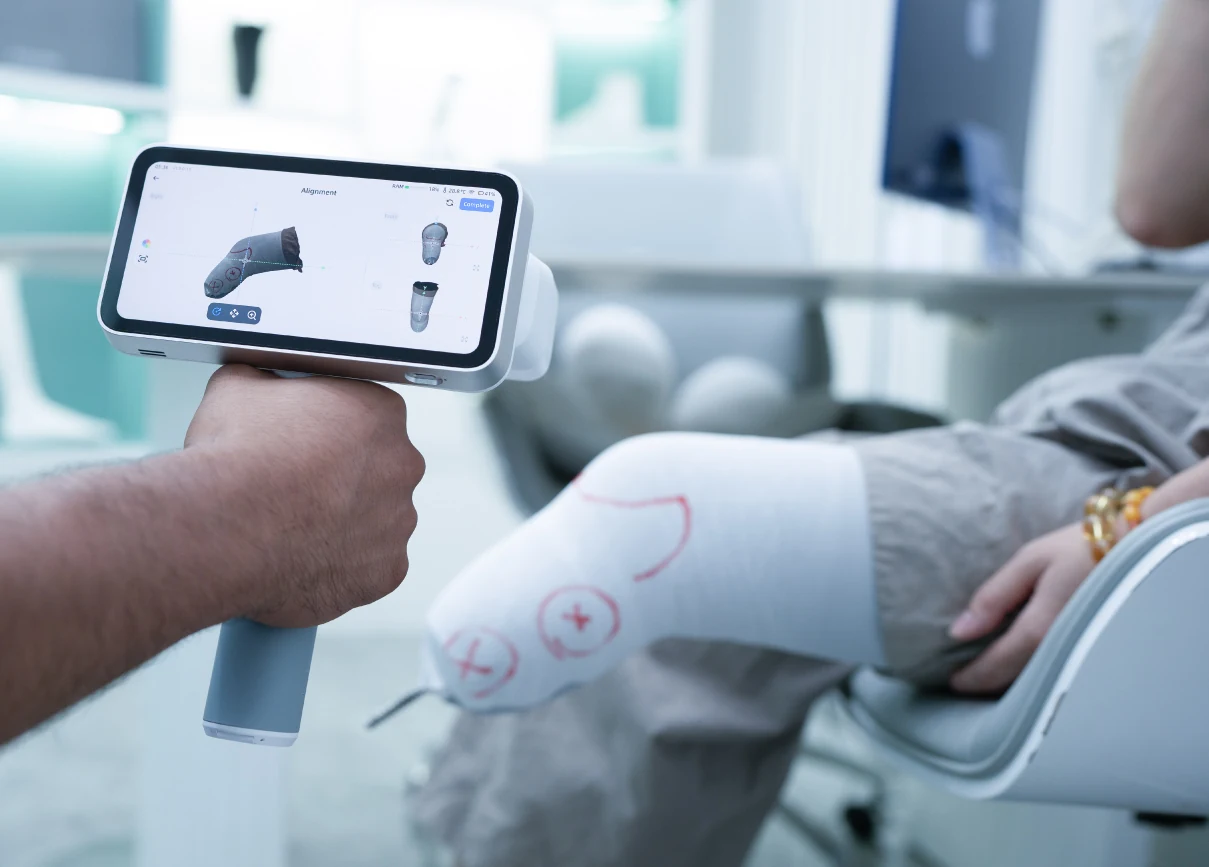
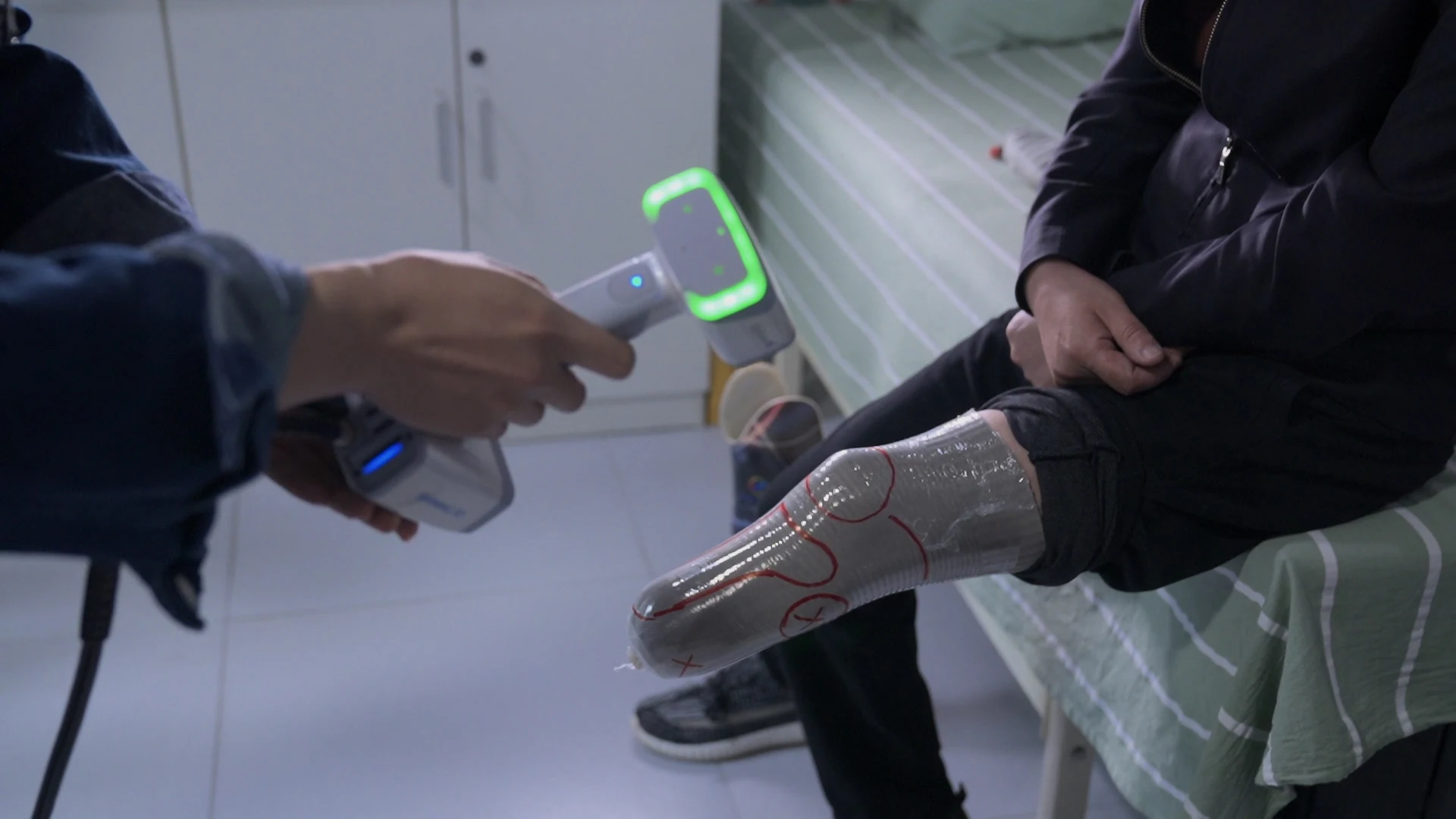
Clinician scanning a marked residual limb while the EinScan Medixa on-screen EXScan O&P Alignment view aligns the socket mesh

Real-Time, Step-by-Step, Contact-Free

EXScan O&P guides capture in real time with an on-screen, step-by-step interface — mode selection, scan, alignment, then save — so a clinician can digitize a residual limb, socket, or foot in minutes instead of taking a plaster cast. Contact-free scanning removes the discomfort of traditional casting, movement compensation holds accuracy while the patient shifts, and the intelligent alignment algorithm stitches passes automatically. The finished watertight mesh exports straight into O&P design software.

WorkflowMode · scan · align · save
CaptureContact-free · movement compensation
AlignmentIntelligent auto-align
Guided Four-Step Workflow

Mode Selection to Export — Four Guided Steps.
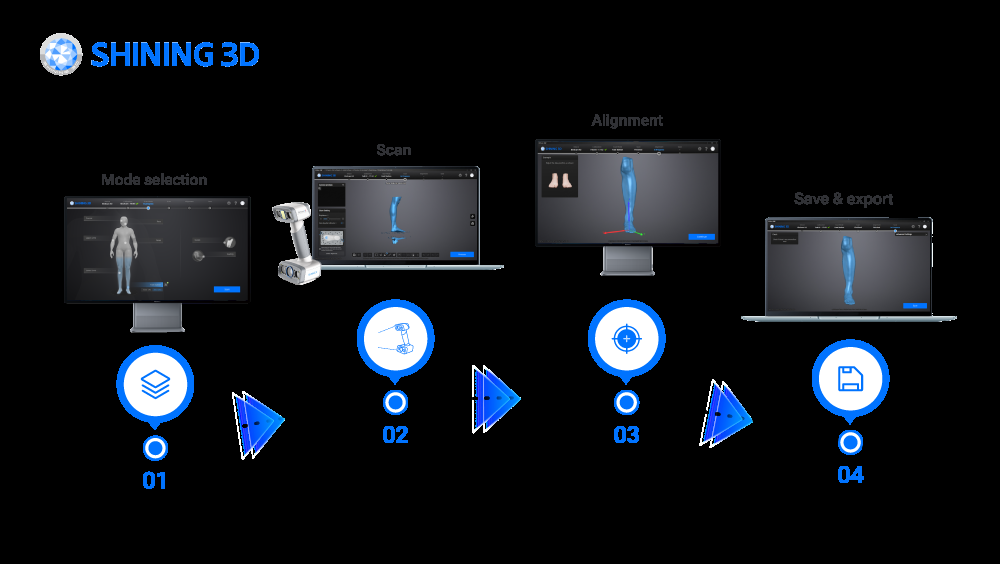
SHINING 3D EXScan O&P four-step workflow diagram — mode selection, scan, alignment, and save and export
Intuitive & User-Friendly

Mode Selection → Scan → Alignment → Save & Export

An intuitive, user-friendly workflow walks the operator through four clear steps — select the body scan mode, capture in real time, let the intelligent algorithm align the passes, then save and export. Pre-configured presets and automatic alignment keep manual post-processing to a minimum, so a full digital case takes about an hour instead of the five hours a traditional plaster workflow demands — cleaner data, a better patient experience, and a repeatable process any technician can run.

Real-Time Step-by-Step Guidance Automatic Alignment Digital Archiving & Progress Tracking
Want to see the O&P workflow end-to-end?
Book a live EinScan Medixa + EXScan O&P demo with Rev1.
Bring a representative case — Rev1 runs the full EXScan O&P workflow live: preset mode selection, contact-free capture, auto-alignment, and mesh export. See exactly how the free software pairs with the EinScan Medixa or H2 for your clinic. No purchase required.
Output & Design Hand-Off

Export a Watertight Mesh — Straight Into O&P Design.
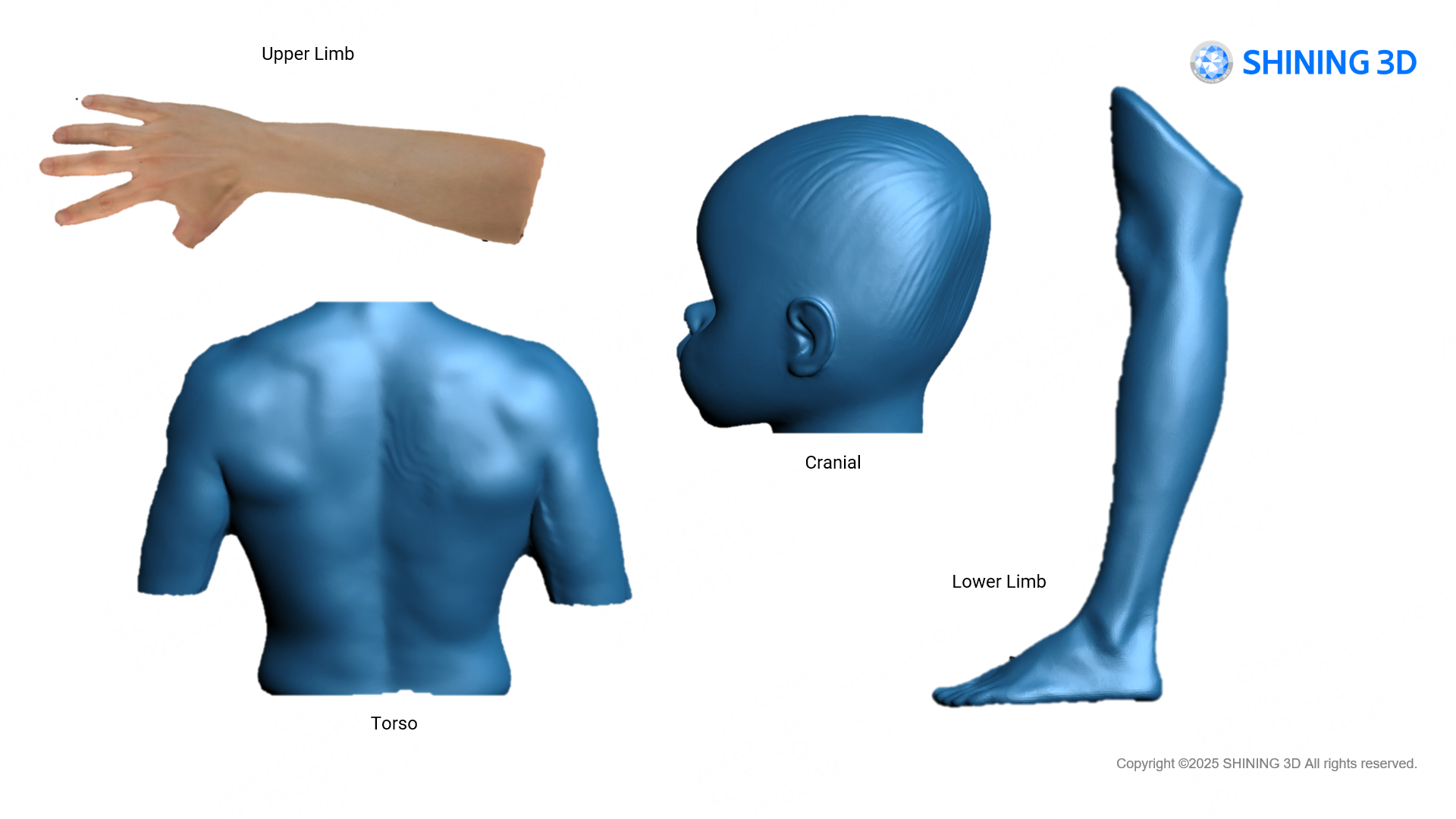
SHINING 3D EXScan O&P high-quality 3D scan results — upper limb, torso, cranial, and lower-limb meshes ready for export

STL & OBJ for CAD / CAM & 3D Printing

EXScan O&P exports the finished body scan as a watertight STL or OBJ — a precise digital cast that drops straight into O&P CAD / CAM software for socket design, insole and AFO / KAFO modelling, cranial-helmet design, and seating. High-quality output from the pre-configured presets means less clean-up before design, and the same mesh feeds a 3D printer or a mill directly. One contact-free scan replaces the plaster cast, the shipping, and the manual measurement it used to take.

Mesh OutSTL · OBJ
Design Hand-OffO&P CAD / CAM · socket · insole · AFO
Fabrication3D print · mill ready
Applications

One Free Software, Every O&P Application.

Wherever an EinScan Medixa or H2 captures a patient, EXScan O&P turns the scan into a usable digital cast. Pair the right scanner with EXScan O&P and book a live scan demo on your own case.
Prosthetic Socket Capture Transtibial & Transfemoral Limbs AFO / KAFO Bracing Custom Foot Orthotics & Insoles Cranial Remodelling Helmets Scoliosis & Torso Bracing Custom Seating Facial & Upper-Limb Prosthetics
Clinician using a handheld EinScan O&P scanner to digitize a patient's marked residual limb in a clinic
Any Body Part, Any Case

From Insoles to Full Sockets — Digitally

Because EXScan O&P drives the EinScan Medixa and H2 across every body-scan preset, the same workflow scales from a small custom insole to a full transfemoral socket or a cranial-remodelling helmet. Contact-free capture is faster and more comfortable than plaster casting, the digital archive supports before / after documentation and progress tracking, and the exported mesh feeds whatever comes next: socket and brace design, 3D printing, or milling. One free tool, the whole O&P clinic.

Editions & Availability

EXScan O&P for the EinScan Medixa & H2 — Free With the Scanner.

SHINING 3D ships EXScan O&P with its dedicated orthotics-and-prosthetics scanners — and it is free of charge, bundled with the scanner, with free updates for life. Rev1 confirms the right EinScan O&P scanner and makes sure EXScan O&P is installed and configured for your clinic's cases.

Free
EinScan Medixa
The wireless, all-in-one body scanner built for O&P — onboard processing with no external computer, and every EXScan O&P preset for cranial, limb, torso, foot, seating, and socket. Free with the scanner.
Free
EinScan H2
The handheld hybrid-light scanner running EXScan O&P for digital body capture — the same preset modes, contact-free workflow, and STL / OBJ export driven from a connected workstation. Free with the scanner.
SDK
Developer Integration
EXScan O&P and the EinScan Medixa both support SDK access, so clinical partners and developers can integrate SHINING 3D scanning into their own O&P software pipelines. Included at no charge.
License FeeNone — free of charge
Software UpdatesFree for life
DeliveryBundled + support download
MaintenanceFree
Rev1 SetupIncluded with your scanner
Competitive Analysis

SHINING 3D EXScan O&P vs. Artec Studio vs. Structure Scanner Apps

How EXScan O&P compares on the things that matter in O&P scanning software — license cost, preset body modes, contact-free workflow, and export formats.

CapabilitySHINING 3D EXScan O&PArtec StudioStructure / Tablet Apps
License costFree — bundled with scannerPaid subscriptionApp / subscription
O&P-specific preset modesCranial, limb, torso, foot, socket, seatingGeneral-purposeLimited presets
Contact-free guided workflowReal-time, step-by-stepGuidedGuided
Automatic alignmentIntelligent auto-alignAuto-alignBasic
Export formatsSTL, OBJSTL, OBJ, PLY + moreSTL, OBJ
Software updatesFree for lifeWith subscriptionWith subscription

Competitor figures are approximate, from publicly available manufacturer information, and vary by version and hardware; provided by Rev1 Technologies for general orientation. EXScan O&P is included free with the EinScan Medixa and H2 and covers the full O&P capture-to-mesh workflow with free lifetime updates and dedicated body-scan presets; Artec Studio leads on the deepest general-purpose post-processing feature set, and tablet-based apps on portability for lighter cases. Rev1 can scope all three against your clinic's cases and scanner.

EXScan O&P is free — the scanner is the decision.
Let Rev1 pair you with the right EinScan O&P scanner.
EXScan O&P ships free with the EinScan Medixa and EinScan H2. What matters is which scanner fits your clinic — the wireless all-in-one Medixa or the handheld H2. Rev1 scopes your O&P applications and recommends the right scanner, then makes sure EXScan O&P is set up for your workflow.
Specifications

SHINING 3D EXScan O&P Technical Data & System Requirements

Software
SHINING 3D EXScan O&P
Vendor
SHINING 3D Tech Co., Ltd.
Category
Orthotics & prosthetics 3D-scanning software
Price
Free — bundled with the EinScan Medixa / H2
License Type
Free of charge · no license fee
Maintenance
Free — software updates included for life
Scan Modes
Cranial, face, upper / lower limb, torso, foot station, seating, socket
Foot Station
Insole, SMO, AFO / KAFO sub-presets
Capture
Contact-free · real-time · movement compensation
Alignment
Intelligent automatic alignment
Operating System
Windows 10 / 11 64-bit (H2 workstation); onboard on Medixa
Processor
Intel Core i7 / i9 or AMD Ryzen 7 / 9 (H2 workstation)
Memory (RAM)
16 GB minimum — 32 GB recommended for large scans
Graphics
NVIDIA GTX / RTX with 4 GB+ VRAM (8 GB for large data)
Storage
SSD recommended for scan / case data
Export Formats
STL, OBJ
Digital Archiving
Before / after documentation · progress tracking
Integration
SDK access for custom O&P pipelines
Compatible Scanners
EinScan Medixa, EinScan H2
Download
Free from SHINING 3D / EinScan support portal

RESOURCES

Downloads & Technical Support

Everything you need to install, update, and get the most out of SHINING 3D EXScan O&P.

EXScan O&P Software Download
Download the latest free EXScan O&P build for your EinScan Medixa or H2 from the SHINING 3D support portal — Rev1 confirms the right version for your scanner.
Download EXScan O&P →
Live Demo
See EXScan O&P run the full capture-to-mesh workflow on your own case. Rev1 pairs the right EinScan O&P scanner and walks you through it — no purchase required.
Rev1 Technical Support
Installation, version fit, scanner pairing, O&P workflow training, and calibration help from Rev1 — call (248) 707-2950.

WHY REV1 TECH

Authorized SHINING 3D Reseller. Industrial & Medical Metrology Specialists.

Rev1 Technologies is an authorized SHINING 3D partner headquartered in Auburn Hills, MI, with direct expertise in 3D scanning, reverse engineering, and digital-workflow deployment.

YOUR REV1 PARTNER
AUTHORIZED SHINING 3D RESELLER

Rev1 serves O&P clinics, manufacturers, and QC teams across the USA. EXScan O&P is free with the EinScan Medixa and H2 — but the value is in the pairing: we scope the application, recommend the right scanner, configure the software, train clinicians, and support your team so the scan-to-mesh pipeline delivers from day one.

01
Application & Scanner Review
Our engineers confirm which EinScan O&P scanner and EXScan O&P preset fit your cases, accuracy, and throughput before you buy — not after.
02
Software Setup & Clinician Training
EXScan O&P installation, calibration, workflow configuration, and hands-on clinician training — anywhere in the U.S.
03
Free Demo on Your Case
Bring Rev1 a representative case — we run the full EXScan O&P capture-to-mesh workflow and deliver the result before you buy.
04
Direct Engineering Support
Call (248) 707-2950 — a person answers. Scanning and software help for the life of the deployment.
05
Updates & Version Guidance
EXScan O&P updates are free — Rev1 flags the right version for your scanner and helps you upgrade cleanly.
06
Software & Hardware Pairing
Rev1 pairs EXScan O&P with the right EinScan O&P scanner and validates the end-to-end scan-to-mesh pipeline.
Buyer FAQ

SHINING 3D EXScan O&P — questions buyers ask.

What is SHINING 3D EXScan O&P?
EXScan O&P is SHINING 3D's dedicated orthotics-and-prosthetics scanning software, purpose-built for the EinScan Medixa and EinScan H2. It guides you step-by-step from mode selection through contact-free capture, automatic alignment, and export — with pre-configured presets for cranial, face, upper limb, torso, lower limb, foot station (insole, SMO, AFO / KAFO), seating, and socket — and exports a watertight STL or OBJ ready for O&P CAD / CAM.
How much does EXScan O&P cost?
EXScan O&P is free. Use and maintenance of the software are free of charge, and it is bundled with the EinScan Medixa and EinScan H2 O&P scanners — delivered with the scanner and available to download from the SHINING 3D support portal. Software updates are free for life. There is no license fee and no subscription; the scanner is the purchase, and the software comes with it.
Which scanners does EXScan O&P support?
EXScan O&P runs on SHINING 3D's dedicated O&P scanners: the wireless, all-in-one EinScan Medixa, which processes onboard with no external computer, and the handheld hybrid-light EinScan H2, driven from a connected workstation. Rev1 confirms the exact version for your scanner and makes sure it is installed and configured for your clinic's cases.
What body parts and modes does EXScan O&P scan?
EXScan O&P ships pre-configured presets for cranial, face, upper limb, torso, lower limb, foot station, seating, and socket. The Foot Station mode adds insole, SMO, and AFO / KAFO sub-presets for a scanning platform. Each preset is tuned for the body part so operators capture clean, high-quality data without manual parameter tuning.
What file formats does EXScan O&P export?
EXScan O&P exports the finished body scan as a watertight STL or OBJ — a precise digital cast that drops straight into O&P CAD / CAM software for socket design, insole and AFO / KAFO modelling, cranial-helmet design, and seating, and feeds a 3D printer or mill directly. One contact-free scan replaces the plaster cast and the manual measurement it used to take.
How does EXScan O&P speed up the O&P workflow?
EXScan O&P introduces a fully digital, contact-free workflow — mode selection, real-time scan, automatic alignment, then save and export — that reduces case time from about five hours with a traditional plaster process to roughly one hour, while improving accuracy and patient comfort. Pre-configured presets and intelligent auto-alignment keep manual post-processing to a minimum.
What are the system requirements?
The EinScan Medixa processes onboard and needs no external computer. For the EinScan H2, EXScan O&P runs on a Windows 10 / 11 64-bit workstation — Rev1 recommends an Intel Core i7 / i9 or AMD Ryzen 7 / 9, 16 GB RAM (32 GB for large scans), an NVIDIA GTX / RTX GPU with at least 4 GB VRAM, and an SSD for case data. Rev1 confirms your workstation meets the requirements for your scanner.
Can I integrate EXScan O&P with my own O&P software?
Yes. EXScan O&P and the EinScan Medixa both support SDK access, so developers and clinical partners can integrate SHINING 3D scanning directly into their own O&P design and CAD / CAM pipelines. The exported STL / OBJ also opens in any standard O&P design suite. Rev1 can scope and set up the full pipeline — scanner, EXScan O&P, and your design software.
What does Rev1 include with an EinScan O&P + EXScan O&P purchase?
Rev1 is your authorized US SHINING 3D reseller and support partner: application and scanner review, EXScan O&P installation and calibration, workflow configuration, clinician training, version guidance, and a free demo on your own case before you buy. EXScan O&P itself is free with the scanner — Rev1 makes sure the whole pipeline works. Call (248) 707-2950.

FREE WITH EVERY EINSCAN O&P SCANNER

Get SHINING 3D EXScan O&P From an Authorized Reseller

EXScan O&P is free with the EinScan Medixa and EinScan H2. Download the latest build, or schedule a demo first. Rev1 confirms scanner pairing, version fit, and workflow — and supports your clinic through deployment.

Reply within 1 business day Free software & free updates Authorized SHINING 3D reseller in the USA Training & setup included
Download EXScan O&P →

Auburn Hills, Michigan's premier source for industrial 3D printers, 3D scanners, materials, and software. Serving engineers and manufacturers across North America.

Products
Company
Contact
Payment methods
AMEXApple PayGoogle PayPayPalShop PayUnionPayVISA
Pay over time

© 2026 Rev1 Technologies. All rights reserved.