FFF / FDM 3D PRINTER • ANYCUBIC • REV1 TECH

Anycubic Kobra 4 Combo 260 mm Cube · ACE 2 Pro Multicolor · 600 mm/s

A fast 260×260×260 mm printer with the new ACE 2 Pro multicolor system, 600 mm/s motion, and quiet ≤48 dB operation — sold, shipped, and supported from the USA by Rev1 Technologies.
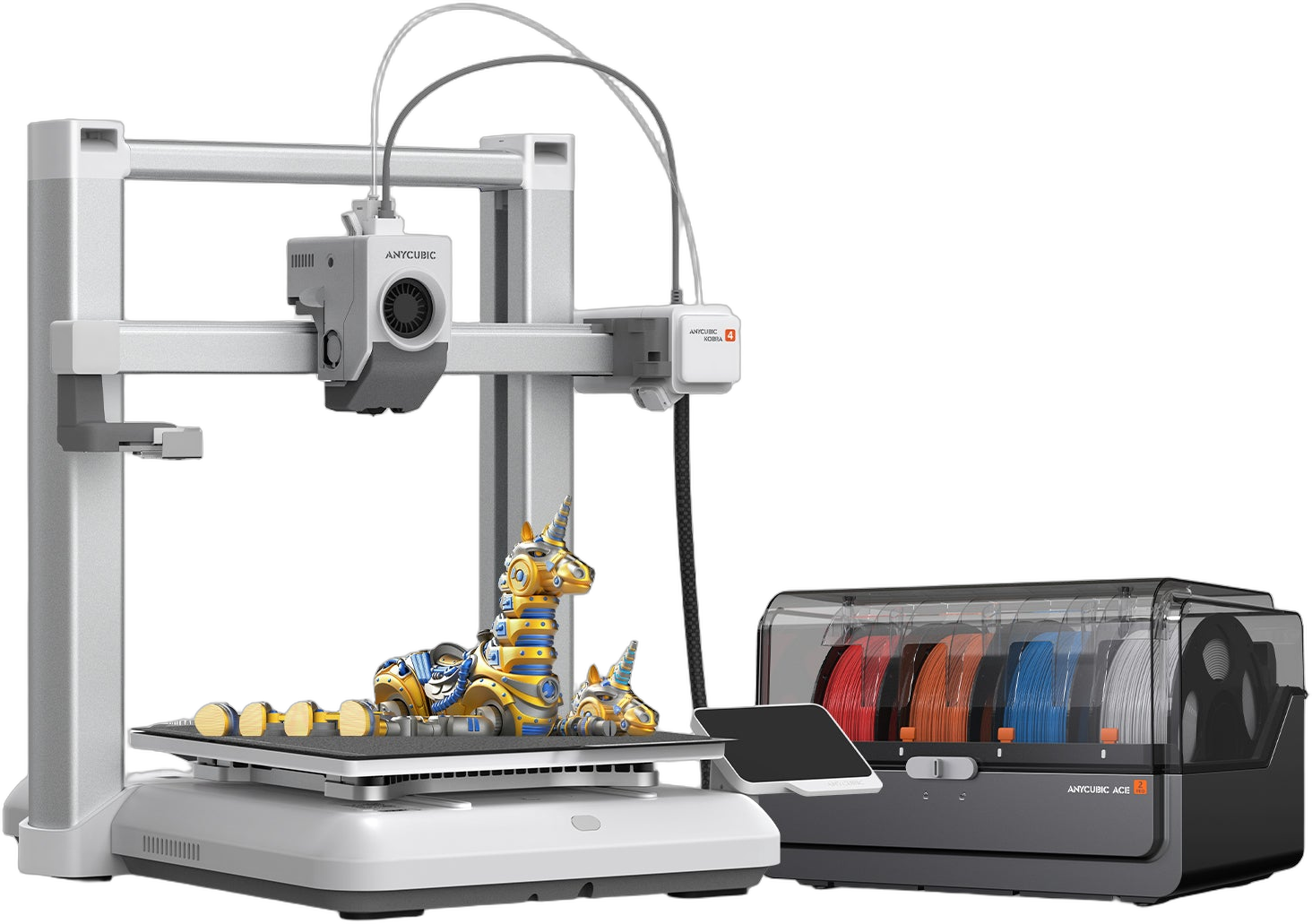
Anycubic Kobra 4 Combo FDM 3D printer with the ACE 2 Pro multicolor system

The Kobra 4 is Anycubic’s fast everyday FDM printer, paired with the new ACE 2 Pro filament system for automatic 4-color printing (8 with a second unit) — a quiet, high-speed machine for makers, classrooms, and small shops. Full specifications →

260³Build Volume (mm)
600 mm/sMax Print Speed
Up to 8Colors (ACE 2 Pro)
≤48 dBQuiet Operation
Materials
PLAPETGTPU 95A (direct only)0.4 mm hardened nozzle0.25 / 0.6 / 0.8 mm optional
Multicolor
ACE 2 Pro Filament System4 Colors (1 unit)8 Colors (2 units)65°C Active Drying
Automation
LeviQ 3.0 Auto-LevelVibration Compensation720P AI CameraPower-Loss ResumeDual-Band Wi-Fi + LAN

US-based reseller — ships from our US warehouse with US phone and video support. Rev1 helps you choose the printer-only, 4-color, or 8-color configuration for your projects before you buy. Questions? Call (248) 707-2950.

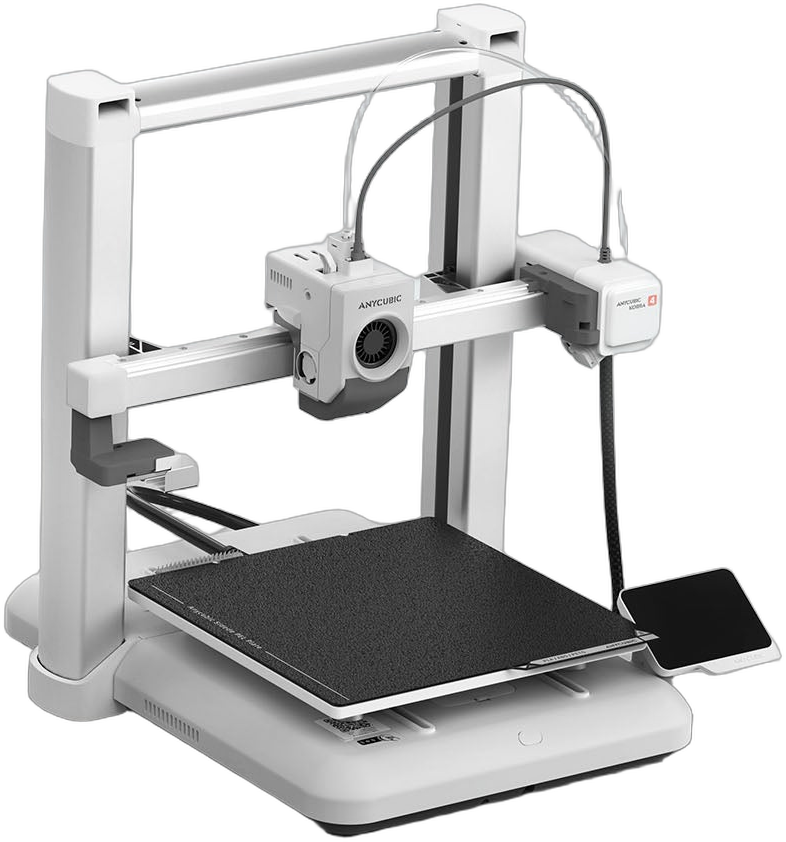
Anycubic Kobra 4 Combo FDM 3D printer with the ACE 2 Pro multicolor unit — front view
Rev1 Technologies · USA Customers · Service & Support

Bought from a US-Based Reseller. Shipped and Supported Stateside.

Rev1 Technologies sells the Anycubic Kobra 4 Combo to customers across the United States — orders ship from our US warehouse, and you get US-based phone and video support to help you set up, calibrate, and dial in multicolor printing. No overseas-only support queue, no customs surprises.
US Phone & Video Support Ships from US Warehouse Setup & Calibration Help
Anycubic 3D printers brand logo
Anycubic 3D Printers
Rev1 Technologies US reseller logo
Your US Reseller & Support
Why the Kobra 4 Combo

Fast, quiet multicolor printing — without the prosumer price tag.

The Anycubic Kobra 4 is built around a 260×260×260 mm cube of build space and the new ACE 2 Pro filament system, so the “Combo” prints in four colors out of the box — eight with a second unit — automatically, while drying your filament as it goes. It runs at up to 600 mm/s with 20,000 mm/s² acceleration, levels itself with LeviQ 3.0’s 49-point probe, cancels ringing with on-board vibration compensation, and watches your prints with a 720P AI camera. A hardened-steel quick-change nozzle, a flexible PEI plate, power-loss recovery, and filament-runout auto-resume keep long unattended jobs from failing halfway through — and at ≤48 dB (45 dB in silent mode) it’s quiet enough to live on a desk or in a classroom. Rev1 Technologies ships it from the USA and supports your setup, so a capable multicolor machine arrives ready to run, not as a science project.

600 mm/s, ~48 dB
A 600 mm/s top speed (300 mm/s recommended) with 20,000 mm/s² acceleration — fast prints that stay quiet at or below 48 dB, 45 dB in silent mode.
ACE 2 Pro Multicolor
The new ACE 2 Pro feeds four colors automatically; add a second unit for eight. Faster color changes and active drying are built in.
260 mm Cube Bed
A 260×260×260 mm envelope handles full helmets, large functional parts, and tall prints most 220 mm desktop machines can’t fit.
LeviQ 3.0 Auto-Leveling
A 49-point probe maps the bed and sets the Z-offset automatically — perfect first layers with no paper-shimming, every time.
720P AI Camera
On-board AI camera with spaghetti and foreign-object detection, object skipping, and time-lapse — monitor and recover long prints remotely.
US Reseller & Support
Bought from Rev1, the Combo ships from a US warehouse with US phone and video support — not just a box from overseas.
Precision & First-Layer Quality

A perfect first layer, then smooth walls at speed
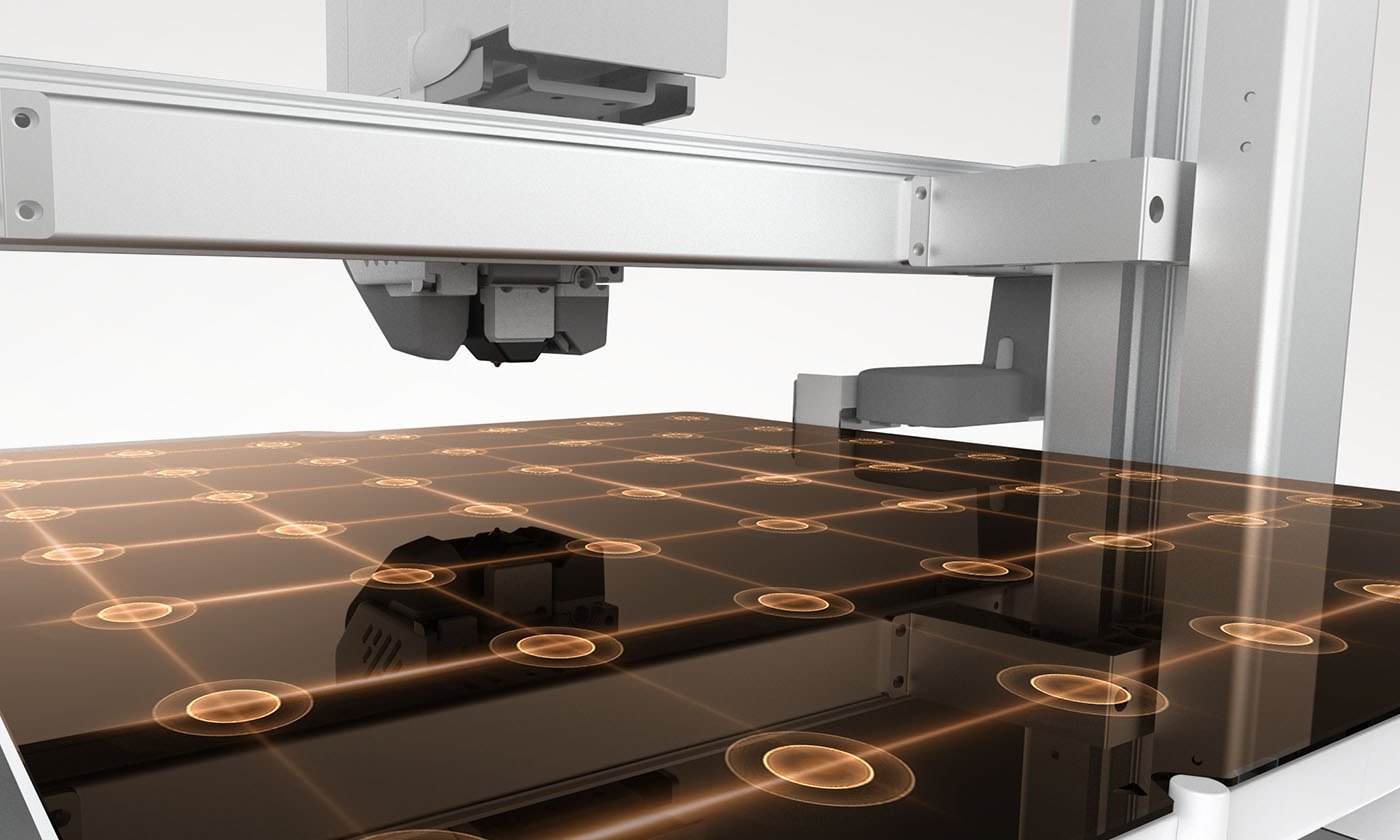
Anycubic Kobra 4 LeviQ 3.0 49-point auto-leveling probe mapping a glowing dotted grid on the bed
LeviQ 3.0 Auto-Leveling

49-point leveling, automatic Z-offset

LeviQ 3.0 probes a dense 49-point grid across the whole plate and sets the Z-offset for you, so first layers stick evenly edge-to-edge without paper shims or trial-and-error. The repeatable leveling routine means you can swap plates, change filament, and start a new print without re-tramming the bed by hand — the part of FDM printing that frustrates first-time owners is simply handled.
LevelingLeviQ 3.0, 49-point
Z-OffsetAutomatic
Build PlateTextured PEI spring steel
RemovalFlex & release
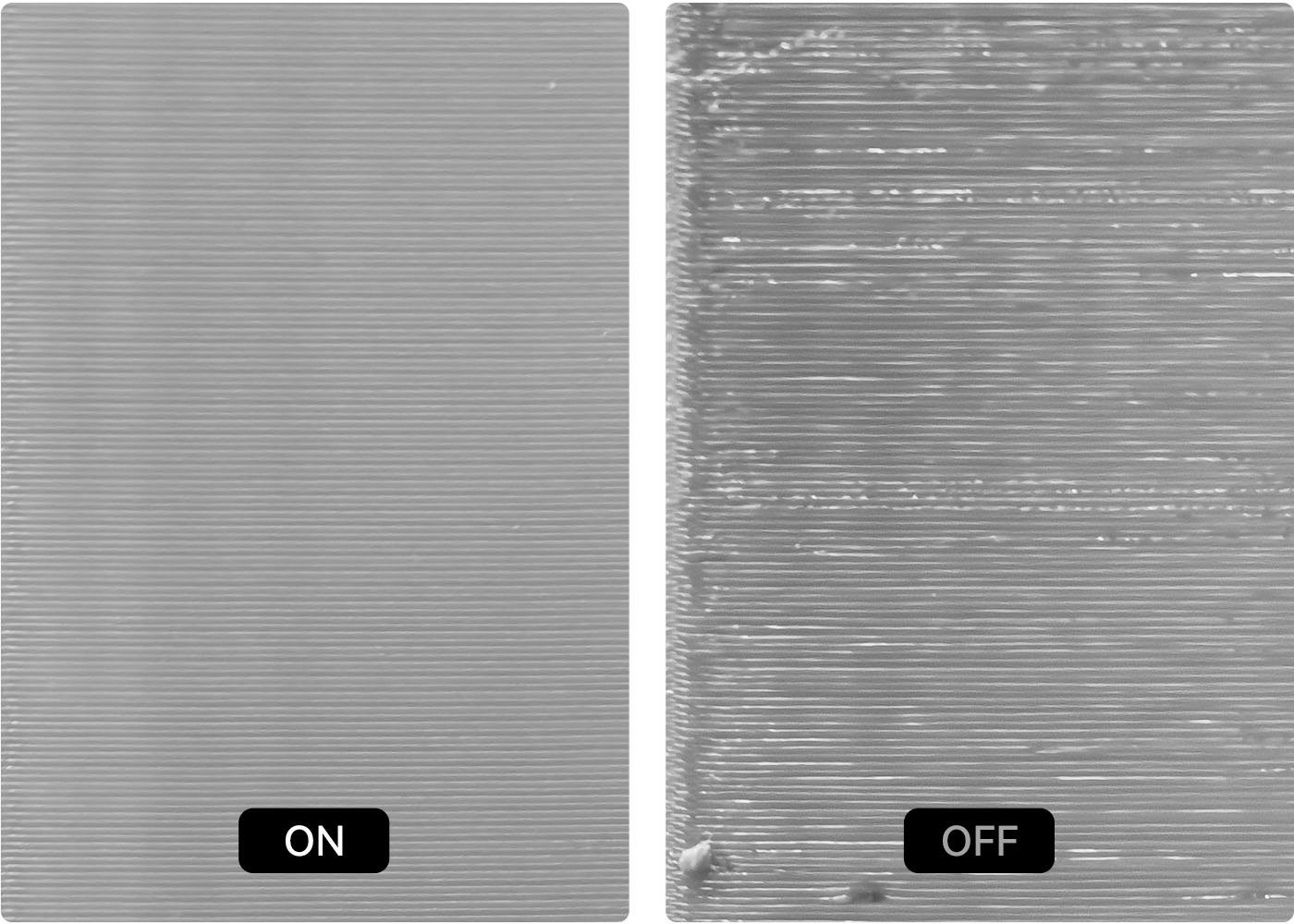
Anycubic Kobra 4 vibration compensation ON versus OFF print-surface comparison showing ghosting removed
Vibration Compensation

No ghosting when you push the speed

Printing fast usually means ringing — those faint echo ripples around corners and text. The Kobra 4’s on-board vibration compensation measures the printer’s own resonance and cancels it, so walls stay smooth even at high speed. Combined with flow-dynamic calibration, which tunes extrusion automatically, you get clean surfaces at 300 mm/s everyday speeds — not just on a slow benchy.

GhostingVibration compensation
ExtrusionFlow dynamic calibration
Recommended Speed300 mm/s
Acceleration20,000 mm/s²
ACE 2 Pro Multicolor

Four colors out of the box, eight with a second unit
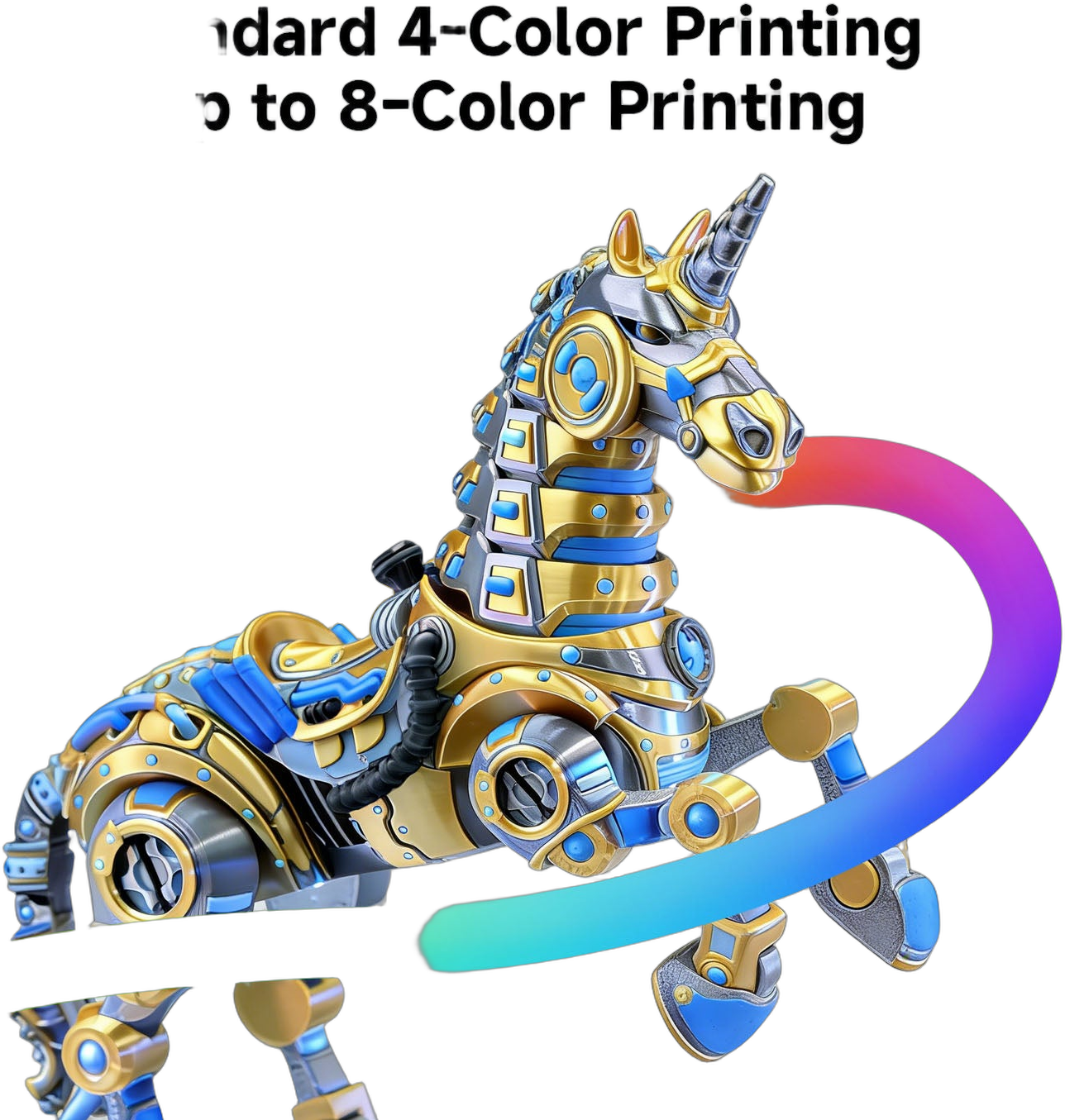
Multicolor robot-unicorn model printed in gold, blue and silver on the Anycubic Kobra 4
Standard 4-Color, Up to 8

Automatic color changes, no manual swaps

The Kobra 4 Combo ships with one ACE 2 Pro unit that loads four spools and switches between them automatically, so multicolor models print start-to-finish hands-off. Stack a second ACE 2 Pro and the printer runs up to eight colors in one job — logos, signage, tabletop minis, and gradient art that a single-extruder machine simply can’t do. The ACE 2 Pro’s four independent brushless motors and faster feed cut color-change time to around 56 seconds. Choose printer-only, 4-color, or 8-color in the buy-box above.
4-Color Combo1× ACE 2 Pro
8-Color Combo2× ACE 2 Pro
Changeover~56 s, automatic
MaterialsPLA / PETG
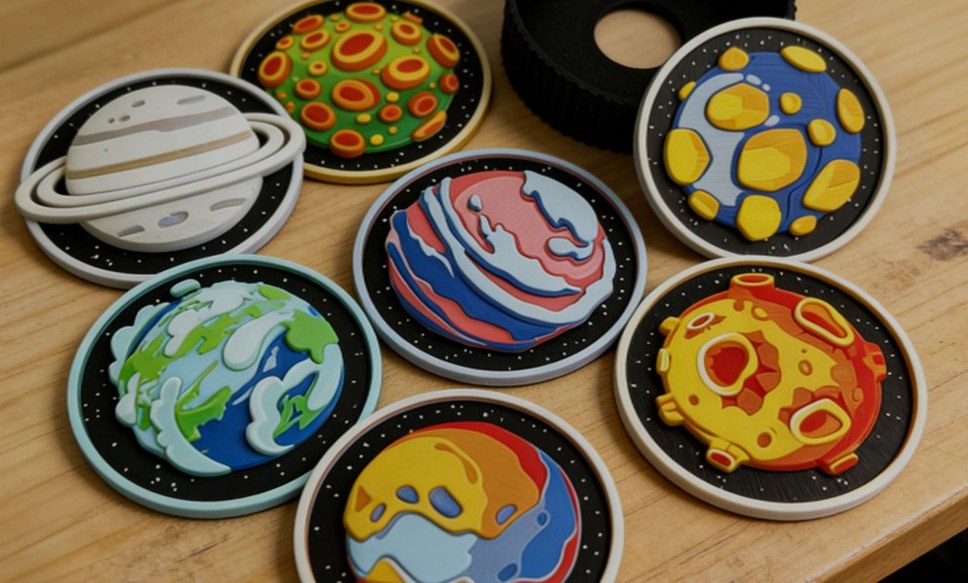
Seven multicolor printed planet and space coasters made on the Anycubic Kobra 4 on a workbench
Real Multicolor Output

Color built into the print, not painted on

Because the ACE 2 Pro changes filament mid-print, color is part of the model itself — no masking, no hand-painting, no gluing separately printed parts. Detailed multi-tone models, themed coasters, signage, and educational pieces come off the bed finished. Smart features like remaining-filament estimation, auto-refill from a backup spool of the same color, and automatic recognition of Anycubic filament keep long multicolor jobs running without you babysitting the feeder.

Colors per Unit4 (up to 16 max)
Feed Rate50 mm/s
Filament IDAuto-recognition
RefillAuto from backup spool
65°C Active Drying

The ACE 2 Pro dries filament while it prints
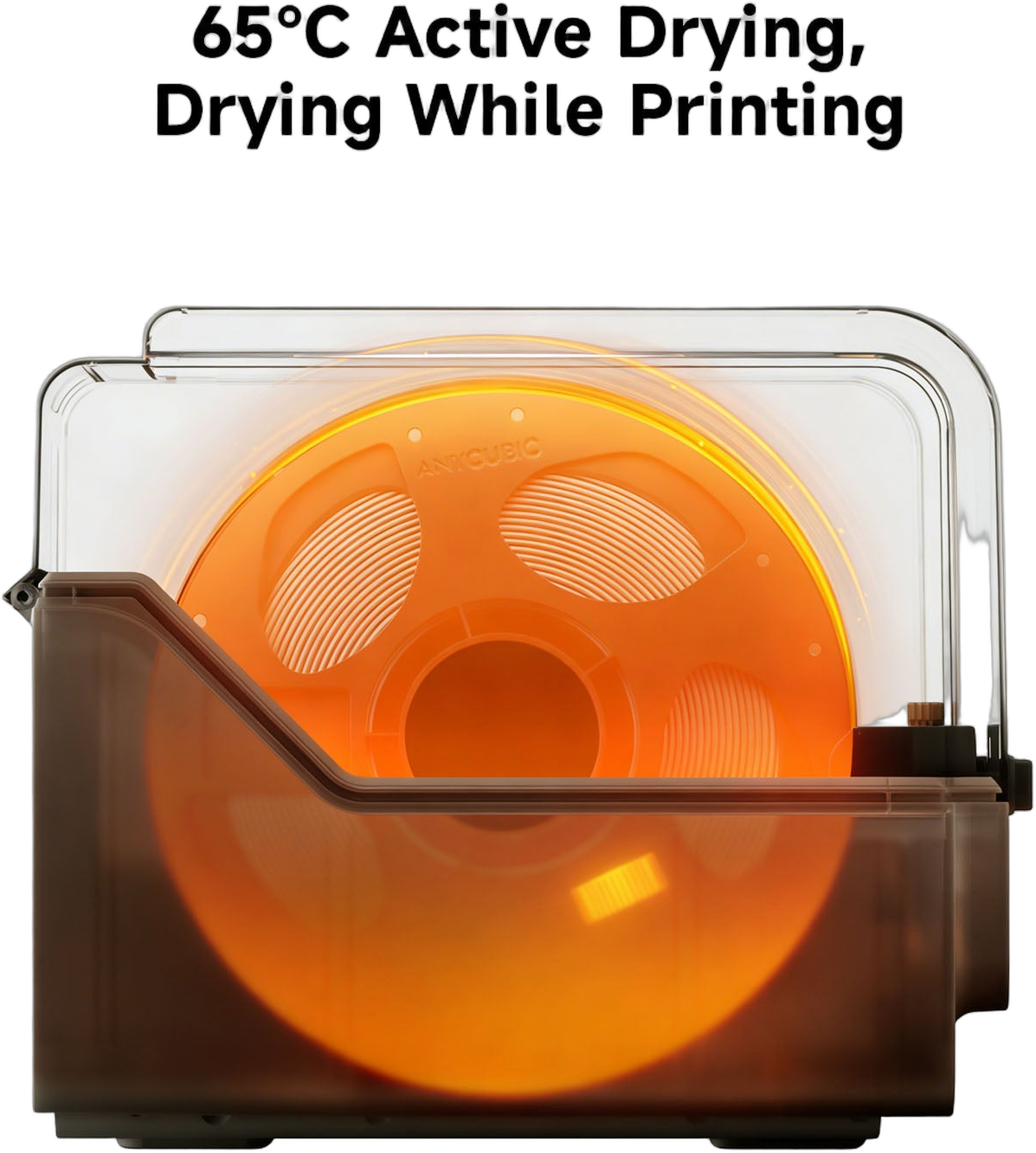
Anycubic ACE 2 Pro enclosed filament box drying a spool with internal heating, orange glow
Drying While Printing

Dry filament means cleaner prints

The ACE 2 Pro isn’t just a feeder — it actively dries your filament up to 65 °C, even while a print is running. Moisture-sensitive PLA and PETG stay dry through long jobs, which means fewer pops, less stringing, and fewer surface defects from wet filament. Spools live sealed in the enclosed box with built-in temperature and humidity sensors instead of sitting open on a rack, so they stay conditioned between prints. (TPU 95A prints on the direct extruder, not through the ACE 2 Pro.)

Drying TempUp to 65°C
StorageEnclosed, sealed box
SensorsTemp + humidity
Best ForPLA, PETG
High-Speed Printing

600 mm/s, a 300 °C hotend, and swappable nozzles
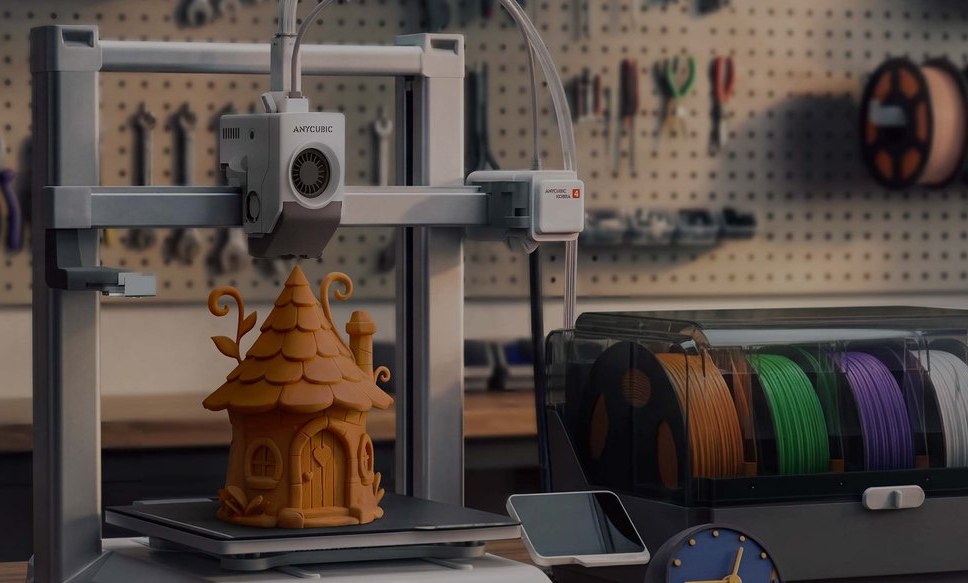
Anycubic Kobra 4 with ACE 2 Pro printing an orange fairy house in a workshop with tools on a pegboard
300 Recommended / 600 Max

Move fast without the wobble

A 600 mm/s top speed with 20,000 mm/s² acceleration means the Kobra 4 finishes a print in a fraction of the time an older 60 mm/s machine would take, while 300 mm/s keeps everyday quality high. A high-flow hotend reaching 300 °C melts plastic fast enough to actually use that speed, and the bed reaches 100 °C for strong PETG adhesion. Vibration compensation keeps the surface clean even as the toolhead flies.
Max Speed600 mm/s
Max Nozzle Temp300°C
Max Bed Temp100°C
Acceleration20,000 mm/s²
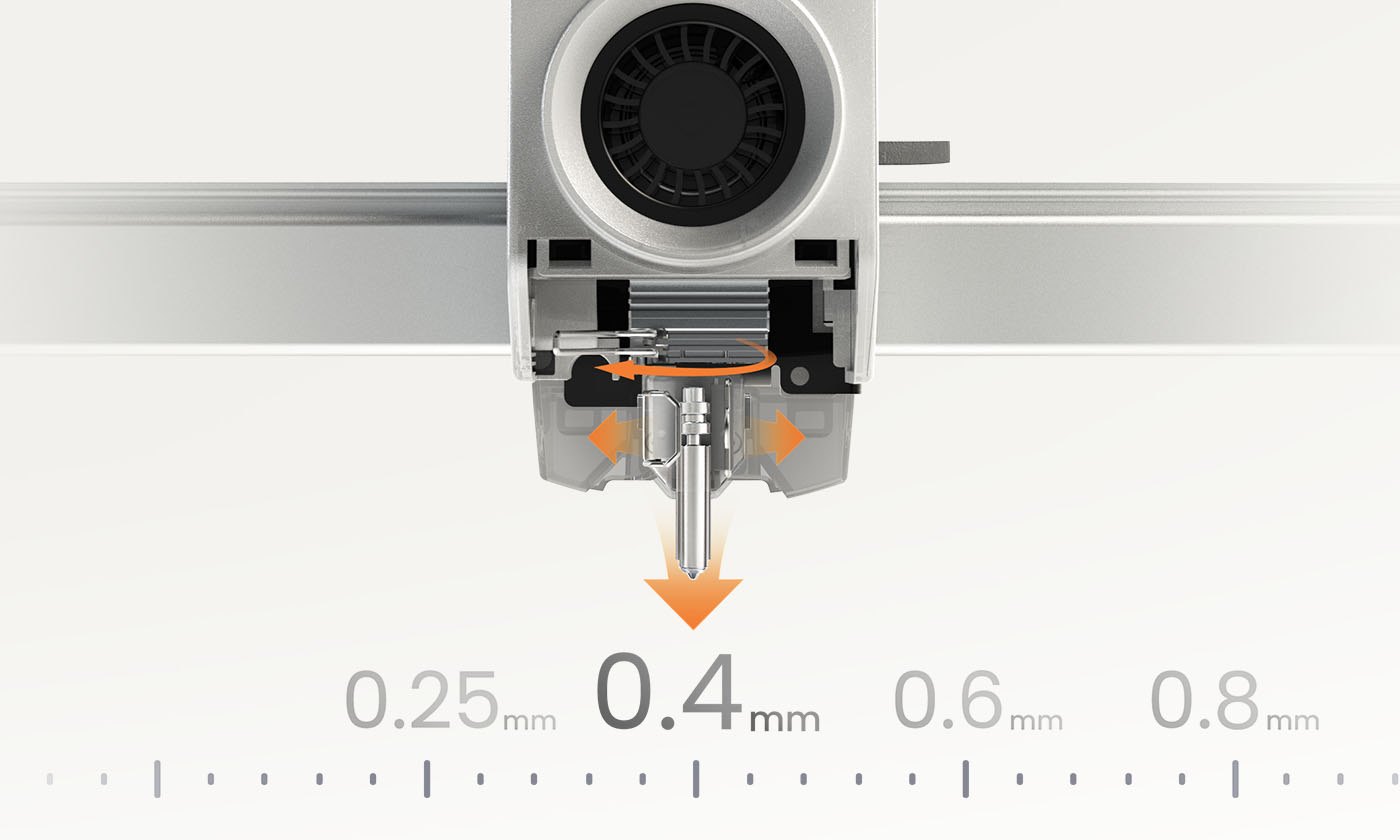
Anycubic Kobra 4 quick-release hotend with a 0.25, 0.4, 0.6 and 0.8 mm nozzle size scale
Quick-Change Hardened Nozzle

Swap nozzles for detail or for speed

The Kobra 4 ships with a 0.4 mm hardened-steel nozzle that resists wear from filled and composite filaments, and the quick-release hotend lets you swap it without tools. Drop to a 0.25 mm nozzle for fine detail, or step up to 0.6 or 0.8 mm to lay down material faster on big, chunky prints. One machine covers everything from miniatures to large functional parts.

Standard Nozzle0.4 mm hardened steel
Optional0.25 / 0.6 / 0.8 mm
HotendQuick-release, tool-free
Filament1.75 mm
Set Up & Forget

Running in 15 minutes — and watching itself after

The Kobra 4 arrives mostly pre-assembled, so you’re from box to first print in about fifteen minutes — lift it onto the bench by the built-in frame handle, run LeviQ 3.0 auto-leveling, and load filament. A color touchscreen running Kobra OS, Anycubic Slicer Next, and the Anycubic App make up a workflow built for someone who isn’t a 3D-printing expert, and the MakerOnline hub gives beginners thousands of ready-to-print models to start with. Once it’s printing, the machine watches itself.
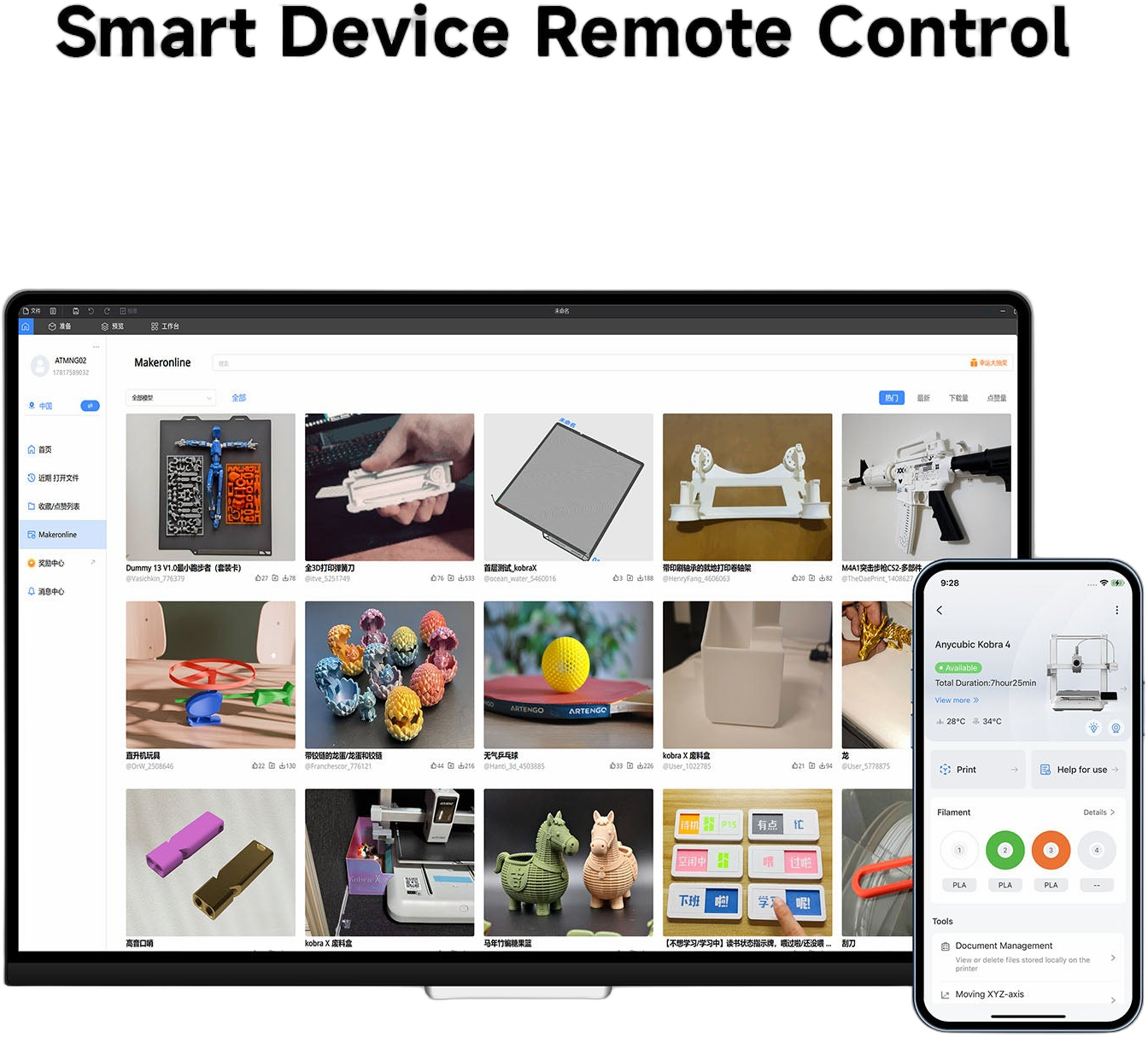
Laptop and phone showing the Anycubic MakerOnline model library and Kobra 4 remote print-status app
720P AI Camera + App

Monitor and recover long prints remotely

An on-board 720P camera with AI spaghetti and foreign-object detection catches failed prints early and can skip a failed object so the rest of the plate completes. Through the Anycubic App you check progress, watch the camera feed, and start or pause jobs from anywhere over dual-band Wi-Fi or a wired LAN connection — useful for the long, unattended jobs multicolor printing encourages. Power-loss recovery and filament-runout auto-resume help those jobs finish reliably.

Camera720P, AI detection
ConnectivityDual-band Wi-Fi + LAN
ResumePower-loss + runout
ControlAnycubic App + cloud
Printer-only, 4 colors, or 8?
Not sure which Kobra 4 configuration fits your projects?
Tell us what you print — single-color functional parts, or multicolor models and signage — and Rev1 will help you pick printer-only, the 4-color, or the 8-color Combo. No pressure, just a straight answer.
Who It’s For

Fast, colorful, and easy — for makers, classrooms, and small shops
Anycubic Kobra 4 on a bench surrounded by colorful printed toys, a building model and trees
One Machine, Many Jobs

From cosplay to classroom to small-batch

The Kobra 4 Combo hits a sweet spot: fast and large enough (260 mm cube) for helmets, props, and functional parts; multicolor enough for signage, educational models, board-game terrain, and tabletop minis; quiet enough at ≤48 dB to sit in a classroom or home office. Small shops use it for jigs, fixtures, enclosures, and short-run multicolor parts where a $2K+ machine isn’t justified. Because the workflow is almost entirely automated — auto-leveling, active filament drying, AI failure detection, and a guided touchscreen — a teacher, librarian, or shop owner can keep it producing without becoming a full-time operator.

Makers & Cosplay
Helmets, props, and functional parts — multicolor without painting.
Education
Quiet, colorful teaching models and an auto-everything workflow non-experts can run.
Small Shops
Jigs, fixtures, enclosures, and short-run multicolor parts at a maker price.
Tabletop & Art
Terrain, minis, signage, and gradient art with up to eight colors per print.
Competitive Analysis

Kobra 4 Combo vs. other single-nozzle multicolor FDM printers

How the Kobra 4 Combo (4-color) compares to other compact, high-speed multicolor FDM combos in its class. Street prices are approximate and move with promotions — ask Rev1 for a current, application-specific comparison.

CapabilityAnycubic Kobra 4 ComboBambu Lab A1 ComboCreality K1C
Approx. street price~$599 (4-color)~$489~$519
Build volume260×260×260 mm256×256×256 mm220×220×250 mm
MulticolorUp to 8 (2× ACE 2 Pro)Up to 4 (AMS Lite)Single color
Active filament dryingYes (ACE 2 Pro, 65°C)No (AMS Lite, no drying)No
Max speed600 mm/s500 mm/s600 mm/s
EnclosureOpen frameOpen frameEnclosed
Best forLargest bed, drying, modular colorPolished ecosystem, resaleEnclosed, higher-temp materials
Ready to print?
Get the Kobra 4 Combo from a US reseller
Order from Rev1 and your Combo ships from a US warehouse with US-based support. Pick printer-only, 4-color, or 8-color in the buy-box, or ask us which fits your projects.
Specifications

Anycubic Kobra 4 Combo Technical Data

Print Technology
FFF / FDM
Build Volume
260 × 260 × 260 mm
Number of Nozzles
1 (direct-drive extruder)
Nozzle Diameter
0.4 mm hardened (0.25 / 0.6 / 0.8 mm optional)
Filament Diameter
1.75 mm
Compatible Materials
PLA, PETG, TPU 95A (TPU direct only, not via ACE 2 Pro)
Max Print Speed
600 mm/s (300 mm/s recommended)
Max Acceleration
20,000 mm/s²
Max Nozzle Temperature
300°C
Max Bed Temperature
100°C
Build Plate
Textured PEI spring steel (flexible)
Auto Bed Leveling
LeviQ 3.0 — 49-point + auto Z-offset
Motion System
Cartesian gantry (bed-slinger)
Multicolor System
ACE 2 Pro — 4 colors (1 unit) / 8 colors (2 units)
ACE 2 Pro Drying
Active drying up to 65°C
Calibration
Vibration compensation + flow dynamic calibration
Camera
720P AI — spaghetti / foreign-object detect, object skip, time-lapse
Filament Detection
Runout detect + auto-resume
Power-Loss Recovery
Supported
Display
Color touchscreen
Firmware
Kobra OS
Connectivity
Dual-band Wi-Fi (2.4 / 5 GHz) + LAN / Ethernet
Slicer Software
Anycubic Slicer Next
Noise Level
≤48 dB (45 dB silent mode)
Machine Dimensions
455.4 × 445.3 × 461.3 mm
ACE 2 Pro Unit
368 × 291.5 × 236.5 mm; ~3.7 kg

RESOURCES

Help & Support

Everything you need to set up and get the most out of your Anycubic Kobra 4 Combo.

Specifications
Full technical data, build volume, materials, and dimensions for the Kobra 4 Combo.
View Specs →
Choosing Your Configuration
Printer-only, 4-color, or 8-color? Ask Rev1 which configuration fits the work you do.
US Support
US-based phone and video support for setup, calibration, and multicolor printing.

WHY BUY FROM REV1

A US Reseller That Actually Supports You

Rev1 Technologies sells the Anycubic Kobra 4 Combo to customers across the USA, shipped from a US warehouse with real human support — not just a listing.

YOUR REV1 PARTNER
ANYCUBIC 3D PRINTERS

When you buy the Kobra 4 Combo from Rev1, you’re buying from a US-based reseller that stands behind the machine — fast US shipping, US phone and video support, and straight answers before and after the sale.

01
Ships from the USA
Your Combo ships from a US warehouse — faster delivery and no customs surprises versus ordering direct from overseas.
02
US Phone & Video Support
Stuck on setup or a multicolor profile? Reach a US-based person by phone or video to get the machine dialed in.
03
Help Choosing the Config
We’ll help you decide between printer-only, 4-color, and 8-color based on what you actually print, before you spend a dollar.
04
Setup & Calibration Guidance
First-layer trouble or stringing? We walk you through leveling, slicer settings, and filament drying so prints come out clean.
05
Filament & Accessories
Need PLA, PETG, spare nozzles, or a second ACE 2 Pro unit? Ask Rev1 for the right consumables and upgrades.
06
One Point of Contact
Questions about your order, your machine, or your prints all go to one US team — not a forum or an overseas ticket queue.
FAQ

Anycubic Kobra 4 Combo — Common Questions

What’s the difference between printer-only, 4-color, and 8-color?
All three are the same Kobra 4 printer. Printer-Only ($455) is the machine on its own — single-color printing, no multicolor unit. The 4-Color Combo ($599) adds one ACE 2 Pro unit, which loads four spools and switches colors automatically. The 8-Color Combo ($999) includes two ACE 2 Pro units (stacked) so you can print up to eight colors in a single job. If you mostly print one color and only occasionally want multicolor, start with printer-only or the 4-color; if multicolor signage, art, or detailed minis are your main use, go 8-color. Choose your configuration in the buy-box above.
How big is the build volume, and what can I print?
The build volume is 260×260×260 mm — a full cube. That’s large enough for helmets, large functional parts, drone frames, planters, and tall prints in a single piece, and noticeably bigger than the 220 mm beds on many budget desktop printers. For very large cosplay armor or full-size props you may still split a model, but for most maker, classroom, and small-shop work the 260 mm cube is plenty.
What materials can the Kobra 4 Combo print?
It prints PLA, PETG, and TPU 95A. PLA and PETG run through the ACE 2 Pro multicolor system, which also actively dries them up to 65 °C. TPU 95A prints through the direct extruder only (not the ACE 2 Pro), because flexible filament doesn’t feed reliably through a multi-material buffer. The standard 0.4 mm nozzle is hardened steel and can be swapped for an optional 0.25, 0.6, or 0.8 mm nozzle. The hotend reaches 300 °C and the bed 100 °C.
How fast does it actually print, and is it loud?
The Kobra 4 has a 600 mm/s maximum speed and 20,000 mm/s² acceleration, with 300 mm/s recommended for everyday quality. Real-world speed depends on the model, layer height, and material, but it’s far faster than older bed-slingers that topped out around 60–100 mm/s. It’s also quiet — rated at or below 48 dB, and about 45 dB in silent mode — so it’s comfortable in a home office or classroom. Note that multicolor prints take longer overall because the printer purges filament at each color change.
Do I have to level the bed manually?
No. LeviQ 3.0 auto-leveling probes a 49-point grid across the bed and sets the Z-offset automatically. You run the auto-level routine and the printer handles first-layer height across the whole plate — no paper-shimming. A color touchscreen guides setup, and Anycubic Slicer Next plus the Anycubic App round out the workflow. Vibration compensation and flow-dynamic calibration further tune the printer for clean results at speed.
Is the Kobra 4 enclosed?
No — it’s an open-frame printer, which suits PLA, PETG, and TPU (the materials it supports). Open-frame designs print these materials reliably and run cooler. If you specifically need an enclosed chamber for high-temperature engineering materials like ABS or nylon, that’s a different class of machine; ask Rev1 and we’ll point you to the right option for those materials.
What’s new about the ACE 2 Pro versus the original ACE Pro?
The ACE 2 Pro is the second-generation multicolor unit. It uses four independent brushless motors (up from a dual-motor design), roughly doubles the feed rate to 50 mm/s, and cuts filament-change time to about 56 seconds. It dries filament at up to 65 °C, adds built-in temperature and humidity sensors, remaining-filament estimation, auto-refill from a backup spool, and automatic recognition of Anycubic filament. You can chain up to four units for as many as 16 colors.
Can I monitor and control prints remotely?
Yes. The Kobra 4 has an on-board 720P AI camera with spaghetti (print-failure) and foreign-object detection plus object-skip, so a failed print can be caught early instead of wasting a full spool. Through the Anycubic App over dual-band Wi-Fi or a wired LAN connection you can monitor progress, watch the camera feed, and start or pause jobs remotely — useful for the long, unattended jobs a multicolor printer encourages. Power-loss recovery and filament-runout auto-resume help those jobs finish reliably.
What do I get by buying from Rev1 instead of ordering direct?
Buying from Rev1 Technologies means the Combo ships from a US warehouse (faster delivery, no customs hassle) and comes with US-based phone and video support — real people who help you with setup, leveling, slicer settings, and multicolor profiles. We also help you choose between printer-only, 4-color, and 8-color before you buy, and source filament, nozzles, or a second ACE 2 Pro unit afterward. Call (248) 707-2950 with any question.

READY TO ORDER

Get the Anycubic Kobra 4 Combo from Rev1

Pick printer-only, 4-color, or 8-color in the buy-box, or ask us which fits your projects. Ships from the USA with US-based support.

Ships from US warehouse US phone & video support Help choosing your config Filament & accessories available

Auburn Hills, Michigan's premier source for industrial 3D printers, 3D scanners, materials, and software. Serving engineers and manufacturers across North America.

Products
Company
Contact
Payment methods
AMEXApple PayGoogle PayPayPalShop PayUnionPayVISA
Pay over time

© 2026 Rev1 Technologies. All rights reserved.