Key Specs
CertifiedPTB Dual Accuracy
InputSTL · OBJ · PTX
ExportPDF · CSV · SNI
PlatformWindows 10/11 x64
License
Add-On
$4,900
Perpetual · own it permanently · 1-yr maintenance included
PTB Certified GD&T Auto Inspect Batch QC
SHINING 3D · 3D Inspection Software

SHINING3D
Inspect

PTB-certified 3D inspection from scan to report — GD&T measurement, on-scanner inspection, and fully automated batch QC in one integrated platform.
SHINING3D Inspect 3D inspection software — SHINING 3D Metrology
Why SHINING3D Inspect
Industrial 3D Inspection That Works Where Other Software Stops
PTB-Certified Dual Accuracy
Certified by Germany’s national metrology institute (PTB) for dual measurement accuracy. The standard that aerospace, automotive, and industrial QC depend on.
Integrated Scan-to-Inspect
One-click transfer from FreeScan Omni, FreeScan UE, and FreeScan Combo Series scanners. No exports, no file conversions — data flows directly into the inspection workspace.
Customizable Reports
Auto-generate branded PDF inspection reports with color-mapped deviation visuals, GD&T callouts, cross-section comparisons, and pass/fail summaries. Export CSV or SNI template formats.
Automated Batch Processing
Auto Inspect runs scan-to-inspection workflows across multiple parts without manual intervention. Set the template once, run hundreds of inspections. Built for production-floor QC volume.
3D Scan
FreeScan · OptimScan · Any STL/OBJ
Import
One-click from scanner software
Align
Multi-method alignment toolset
Inspect
GD&T · 3D compare · sections
Report
PDF · CSV · SNITemplate
Precise Measurement
Full GD&T Inspection — Diameter, Position, Orientation, Distance & Angle
Geometric Tolerancing
Diameter & Position
Measure bore diameters, hole positions, and true position callouts against nominal CAD with full GD&T symbol output. Results shown as 3D color maps and numeric deviation tables.
Angular Measurement
Orientation & Angle
Parallelism, perpendicularity, angularity, and runout measurements with interactive 3D display. Define datums directly from scan geometry — no CAD model required for datum-based measurements.
Linear Measurement
Distances & Gaps
Point-to-point, feature-to-feature, and surface-to-surface distance measurements with tolerance status indicators. Flatness and straightness callouts on prismatic parts.
Visual Feedback
Intuitive 3D Display
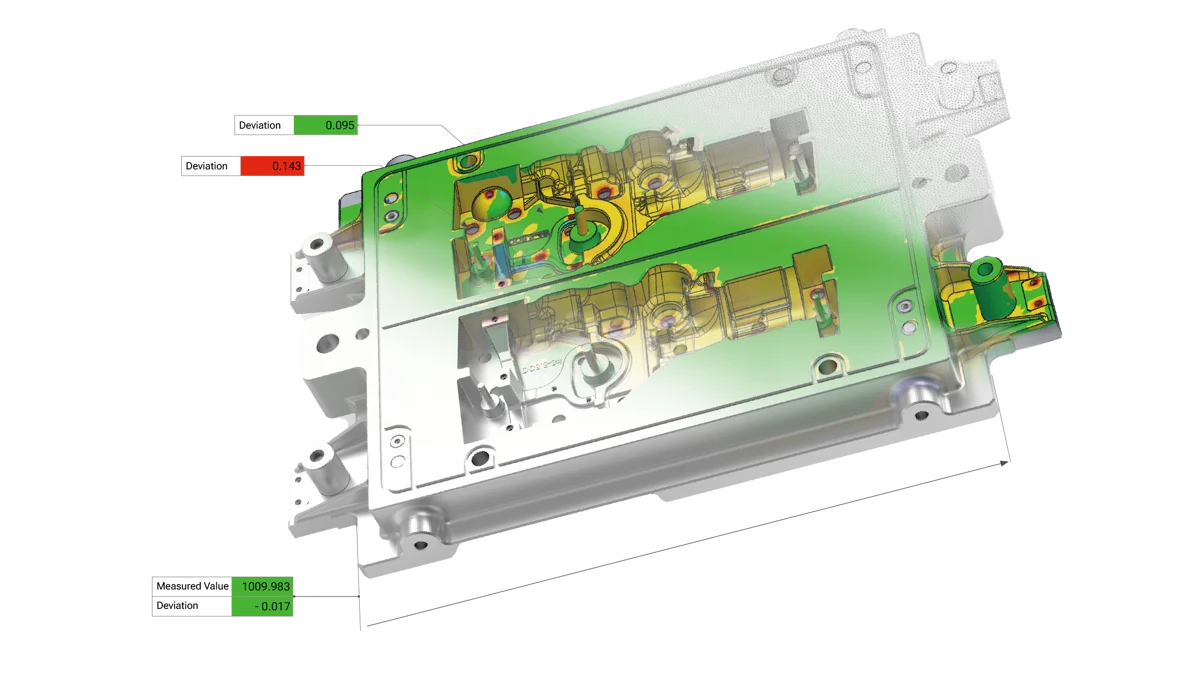
Full-field color deviation maps show every deviation simultaneously across the entire part surface. Hot/cold spectrum from tolerance limits to out-of-spec regions, all at a glance.
Industry Standard
ASME & ISO GD&T
Supports both ASME Y14.5 and ISO 1101 GD&T standards. Switch between standards per project. Full callout symbols in reports match what your drawing reviewers expect to see.
Precision Output
Report-Ready Output
Every measurement result is captured with deviation value, nominal, tolerance limits, and pass/fail status. Export directly to branded PDF reports or structured CSV for SPC integration.
On-Scanner Inspection
Inspect at the Point of Scan — No Post-Processing Required
FreeScan Omni Integration
Run Inspection Templates with One Click — Directly on the Scanner

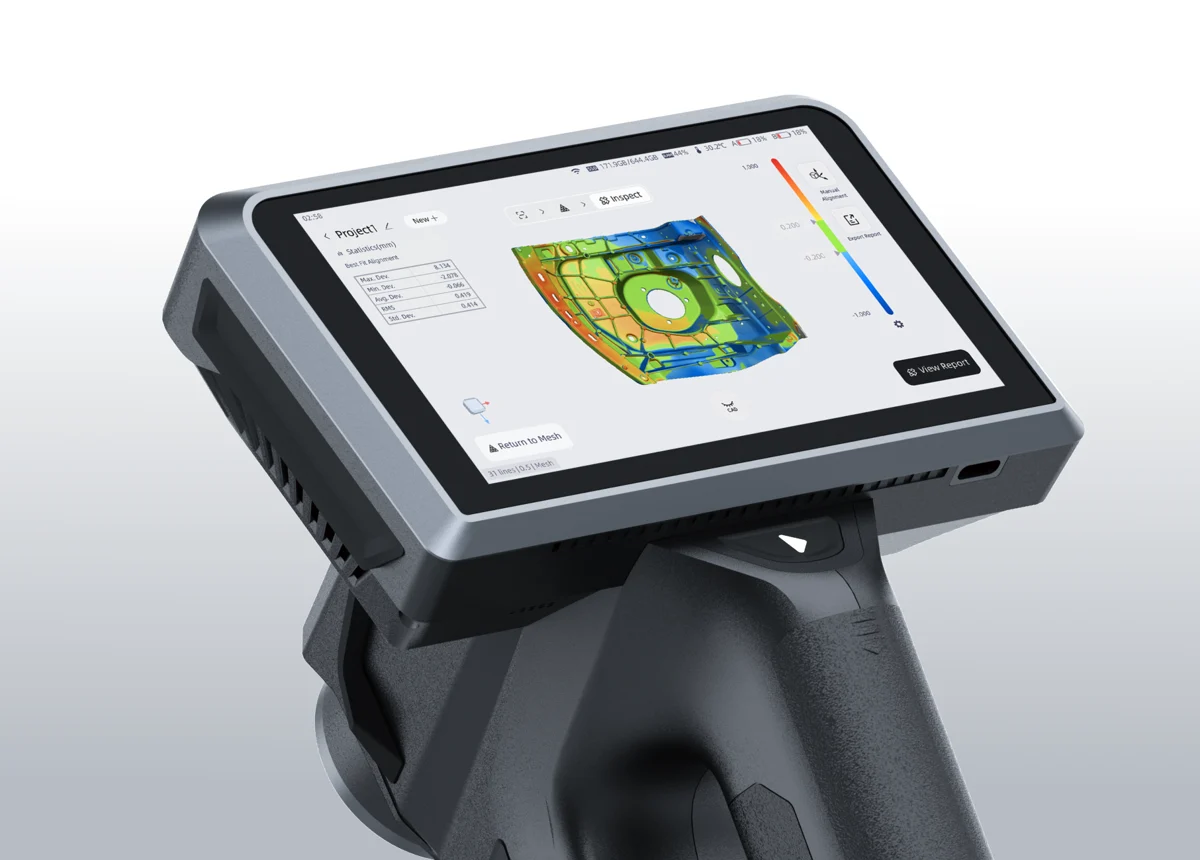
SHINING3D Inspect delivers a seamless non-contact measurement experience directly on the FreeScan Omni — the world’s first standalone inspection-ready metrology scanner. Load an inspection template, scan the part, and get a full color-mapped inspection result without ever leaving the scanner interface. No PC required at the point of measurement. Results are clear, visual, and instantly actionable on the floor.

FreeScan Omni NativeOne-Click TemplatesNon-ContactFloor-Ready
FreeScan Omni running SHINING3D Inspect on-scanner inspection
SHINING3D Inspect on-scanner inspection results display
Template-Driven Workflow
Define Once, Inspect Thousands — Repeatable Results Every Time

Create an inspection template once from your nominal CAD model — define the features to check, set tolerances, configure the report layout. From that point on, any operator can run a fully compliant inspection of that part in minutes. The template handles alignment, feature extraction, measurement, and reporting automatically. Critical for production environments where inspection repeatability is a quality requirement, not a nice-to-have.

Reusable TemplatesOperator-IndependentAuto AlignmentProduction QC
3D Mesh Inspection
Import Any Scan Data — Align, Compare, Measure, Report
Multi-Format Import
STL, OBJ, PTX — From Any Scanner or CMM

SHINING3D Inspect isn’t locked to SHINING 3D hardware. Import scan data from any metrology-grade scanner that outputs STL, OBJ, or PTX format — including CMM point clouds. Multiple alignment methods let you register the scan to nominal precisely: best-fit, RPS (Reference Point System), datum-based, and 3-2-1 alignment. The right alignment method for the right part, every time.

Best-Fit AlignmentRPS AlignmentDatum-Based3-2-1 Method
SHINING3D Inspect 3D mesh inspection and color deviation map
+0.5 +0.25 0.00 -0.25 -0.5 mm Full-Field Color Deviation Map +0.42mm ✗ +0.01mm ✓
Full-Field Analysis
See Every Deviation Across the Entire Surface — Simultaneously

Full-field inspection overlays a color deviation map across the entire scanned surface against the nominal CAD model. Every point on the part is measured and colored — green for in-tolerance, red/orange for over, blue for under. Cross-section analysis cuts through the 3D model at any plane to reveal internal profile deviations. 2D comparison views pull dimensional callouts from section curves for drawing-style reporting.

Full-Field Color MapsCross-Section Analysis2D & 3D Comparison
Automation
Auto Inspect — Batch Processing for High-Volume Quality Control
Scan-to-Inspection Automation
Load Your Parts, Set the Template, Walk Away

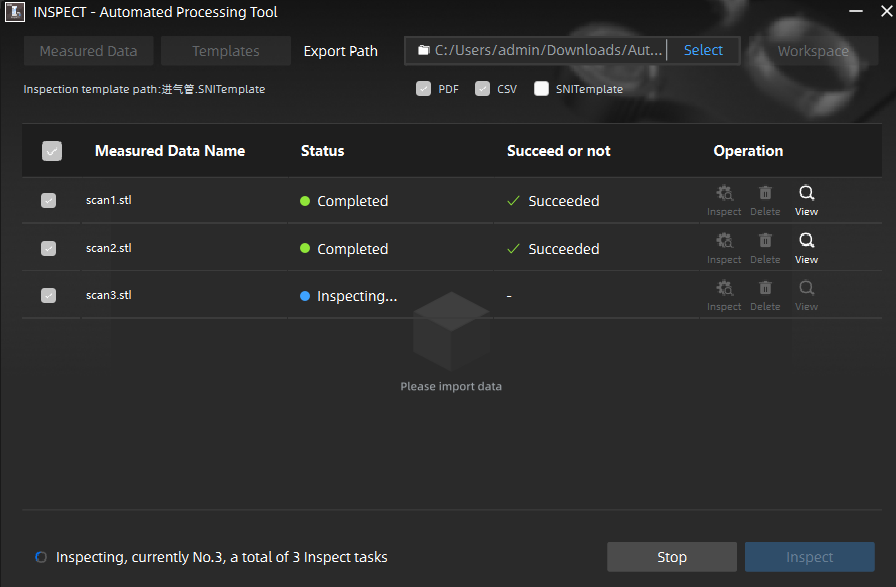
Auto Inspect is SHINING3D Inspect’s integrated automation engine. Queue multiple scan files, assign a single inspection template, and the system processes every part sequentially — aligning, measuring, comparing to nominal, and generating individual inspection reports. The batch queue shows real-time status for every part: Inspecting, Completed, Succeeded, or flagged for review. Built for production environments where manual inspection throughput creates bottlenecks.

Batch Queue ProcessingAuto AlignmentPer-Part ReportsReal-Time Status
INSPECT — Automated Processing Tool
SHINING3D Inspect Auto Inspect batch processing interface — real-time status queue
100%
Repeatable
0
Manual Steps
Parts Per Run
scan1.stl ✓ Succeeded
scan2.stl ✓ Succeeded
scan3.stl ● Inspecting…
Scalable Quality Control
From First Article Inspection to Full Production Runs

Auto Inspect scales to whatever volume your operation demands. First Article Inspection (FAI) on a single part, go/no-go screening on a batch of 50, or overnight processing of hundreds of parts from CNC or casting operations. Every run produces individual reports per part, a batch summary, and exportable CSV data for SPC (Statistical Process Control) integration. When a part fails, you know immediately — and you have the data to prove it.

First Article InspectionProduction ScreeningSPC IntegrationBatch Summary Reports
Complete Toolset
Every Inspection Tool You Need — Nothing You Don’t
Multi Alignment Toolset
Best-fit, RPS, datum-based, and 3-2-1 alignment methods. Interactive alignment preview with real-time deviation feedback before committing.
2D & 3D Comparison
Overlay scan on nominal in full 3D with color maps, or extract 2D section curves for profile comparison in a drawing-view format.
2D Dimensions Inspection
Extract section profiles and measure distances, radii, and angles in 2D views — matching what appears on engineering drawings for direct comparison.
Measurement Toolset
Point-to-point, feature-to-feature, surface distance, flatness, straightness, and cylindricity measurements with tolerance status on every result.
Multi-Format Data Import
STL, OBJ, and PTX from any scanner. Import CAD nominal as STEP, IGES, or native formats. Manage multiple scan datasets and revisions in one project.
Intelligent Feature Recognition
Auto-detects planes, cylinders, cones, spheres, and freeform surfaces from scan data. Eliminates manual feature selection for common geometric primitives.
Cross-Section Analysis
Cut any section plane through the 3D comparison at any angle. Stack multiple sections. Extract contour profiles for weld bead, casting, and extrusion inspection.
Customized Reporting
Drag-and-drop report builder. Add logos, cover pages, measurement tables, color maps, and section views. Export PDF, CSV, or SNITemplate for downstream systems.
PDF
SHINING3D Inspect — Product Brochure
Complete feature overview, technical specifications, and application examples · PDF · 11 MB
Download Brochure
Licensing & Pricing
SHINING3D Inspect — License Options
Maintenance Renewal
$780
per year, after year 1 expires
keeps license on latest version
All software updates & new releases
Access to new features & modules
Technical support access
Renewal at any time
Application Training
$750
per session
on your parts, your workflow
Full-day application training
Hands-on with your scan data
Template creation workshop
Rev1 metrology specialist
EDU licenses also available — 1-seat ($1,000), 10-seat ($2,000), 20-seat ($3,400), 30-seat ($4,800), 50-seat ($6,200). All EDU packs include 1-year maintenance. Contact Rev1 for institutional pricing.
System Requirements
Minimum Specifications
Operating System
Windows 10 / 11 (64-bit)
CPU
Intel Core i7 or equivalent
RAM
16 GB minimum (32 GB recommended)
GPU
Dedicated NVIDIA or AMD (required)
Storage
512 GB SSD recommended
Input Formats
STL · OBJ · PTX · STEP · IGES
Report Export
PDF · CSV · SNITemplate
License Delivery
Email activation — same business day
Common Questions
Frequently Asked — SHINING3D Inspect
What scanners does SHINING3D Inspect work with?
SHINING3D Inspect accepts STL, OBJ, and PTX data from any 3D scanner. Native one-click integration works with FreeScan Omni (on-scanner inspection), FreeScan UE Series, FreeScan Combo Series, and OptimScan. For on-scanner inspection — where the inspection runs directly on the scanner without a separate PC — the FreeScan Omni is required. All other FreeScan models and third-party scanners work through the standard desktop workflow.
What does PTB certification mean for my quality process?
PTB (Physikalisch-Technische Bundesanstalt) is Germany’s national metrology institute — the equivalent of NIST in the US. PTB certification of SHINING3D Inspect’s dual measurement accuracy means the software’s measurement results have been independently verified against traceable standards. For regulated industries like automotive, aerospace, and medical devices, this certification supports compliance documentation and audit requirements.
Can I use SHINING3D Inspect as a standalone product without a SHINING 3D scanner?
Yes. SHINING3D Inspect works as a standalone 3D inspection platform with data from any scanner that outputs STL, OBJ, or PTX format. Import scan data from Creaform, Artec, FARO, Renishaw, or any other metrology scanner. The on-scanner inspection feature (running inspection directly on the device) is exclusive to FreeScan Omni, but all software-based inspection workflows are scanner-agnostic.
What is the difference between 3D Mesh Inspection and Auto Inspect?
3D Mesh Inspection is the interactive workflow: import scan data, align to nominal, measure features, configure your report, and export. You control every step and can explore the deviation map interactively. Auto Inspect is the automated batch mode: you define an inspection template once, then queue multiple scan files and the software processes them sequentially without operator input — producing individual reports per part. Auto Inspect is for production volume; 3D Mesh Inspection is for analysis and first article work.
How does the annual maintenance work after year 1?
The $4,900 license includes the first year of maintenance. After year 1, maintenance is optional at $780/year. Without maintenance, the software continues to work permanently on the version you have. With maintenance, you receive all software updates including major new feature releases. If you let maintenance lapse and want to renew later, contact Rev1 — SHINING 3D allows reinstatement of maintenance without penalty in most cases.
Can SHINING3D Inspect integrate with our SPC or ERP systems?
SHINING3D Inspect exports measurement data in CSV format which can be imported into most SPC (Statistical Process Control) systems including Minitab, InfinityQS, and custom databases. The SNITemplate format is a structured output for downstream inspection data management. For direct ERP integration, contact Rev1 at (248) 707-2950 — we can discuss what the data outputs look like and what custom integration your system might require.
Get a Free Demo on Your Own Scan Data
Send us an STL file from your scanner and we’ll run a live SHINING3D Inspect demo on your actual part — GD&T results, color deviation map, and a sample report included.
(248) 707-2950 · [email protected] · Auburn Hills, MI · Authorized SHINING 3D Partner
Ready to Close Your Inspection Gap?
From Scan
to Certified Report
in Minutes

SHINING3D Inspect. PTB-certified accuracy. GD&T, auto batch inspection, and customizable reports — all in one platform. Authorized SHINING 3D Partner · Auburn Hills, Michigan · (248) 707-2950.

Download Brochure
(248) 707-2950[email protected]Auburn Hills, MI